
The Story Behind This Prompt
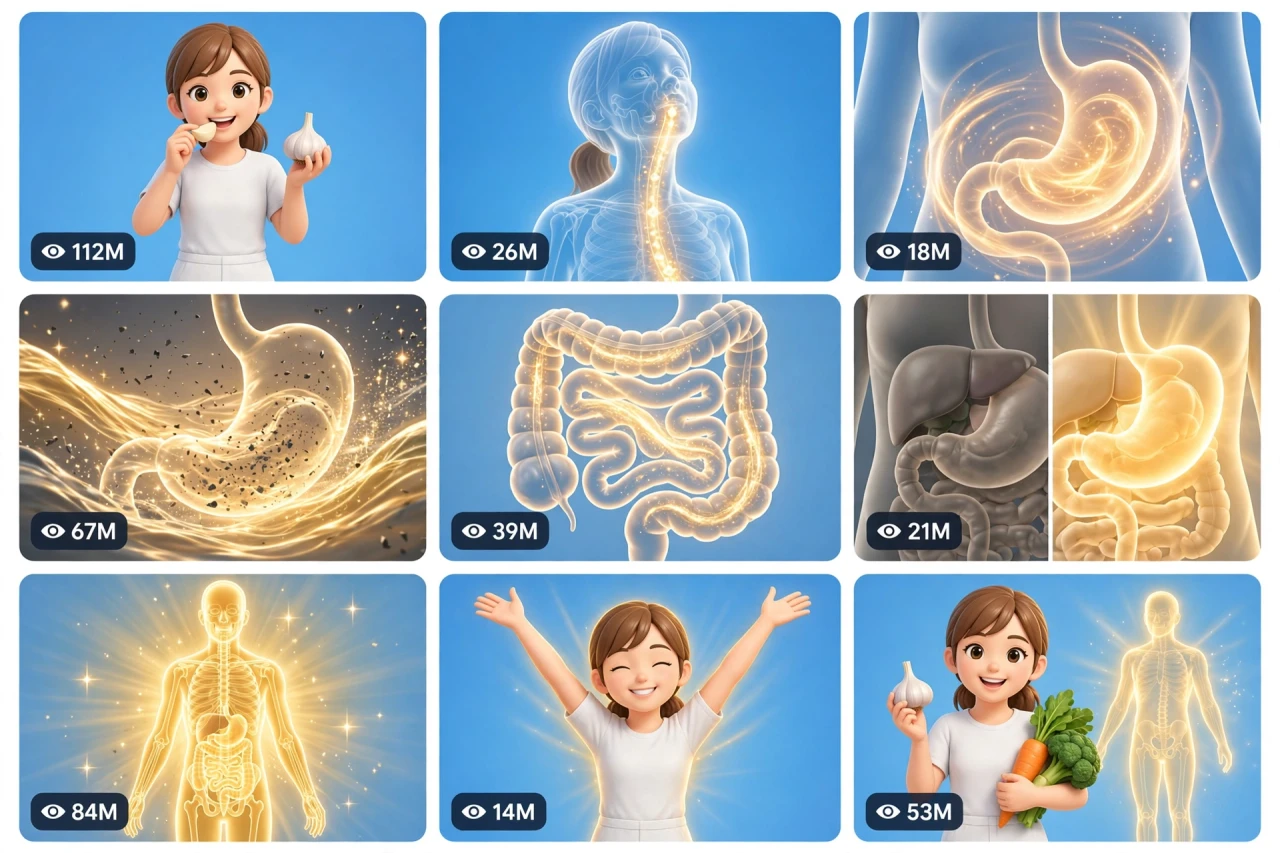
You take one bite of garlic — but what happens NEXT, inside, where nobody can see? These glowing inside-the-body videos answer that question like a theme-park ride: a golden path lights up down the throat, a whole world wakes up in the stomach, and the dull before turns into a radiant after. BODY-OS V1 rebuilds that journey as one smart master prompt: you answer a few simple questions, choose whether you want one ready-made prompt for the whole video or a separate prompt for each scene, and it writes the complete video for you in a clean, friendly science-illustration style — entertainment with a science look, never gory, never scary — with a viral pack of titles, caption and hashtags. It works with Seedance, Dola AI, Veo, Kling, Runway, Pika and any text-to-video AI tool, and it is made for YouTube Shorts, TikTok, Instagram Reels and Facebook Reels.
HOW TO USE:
- Copy the prompt: Scroll down to the code box at the bottom of this post and copy the full BODY-OS V1 prompt — every line, nothing skipped.
- Answer the 5 setup questions: Paste the prompt into a chatbot like ChatGPT (or straight into Seedance, Dola AI or any text-to-video AI tool) and it will ask you 5 simple questions: how long the video is, what food the presenter eats, how we see inside the body, and who the presenter is — and the last one, how you want your final prompt. Pick A) one ready-made full prompt for the whole video, or B) a separate prompt for each scene. If you are ever unsure, just type "surprise me".
- Get your video prompt: The system builds everything for you. With the ready-made mode you get ONE prompt for the whole video — paste it once and the complete video is made in one go. With the scene mode you get one ready prompt per scene, in the perfect order: the bite, the journey beginning, the dull before world, the golden wave, and the radiant after glow.
- Make the video: Paste the prompt into your AI video tool and generate. If you picked the scene mode, make the clips one by one in the same order. Check each clip quickly: the presenter, the food and the illustration style must stay the same in every shot, and the golden path must flow in the right order.
- Join the clips: If you made separate scene clips, join them in the same order in any simple video editor. The final shot is your ending — and your thumbnail.
- Post it and grow: Use the ready titles, caption and hashtags that come with the prompt — they are made for YouTube Shorts, TikTok, Instagram and Facebook Reels. One new inside journey a day keeps the curiosity coming. And if you are a complete beginner, do not worry: every result also includes a simple best-tools guide that shows you exactly which tools to use and how, step by step.
BODY-OS V1 — 3D INSIDE-THE-BODY FOOD TRANSFORMATION ENGINE
The interactive master prompt system that creates the viral "what happens inside your body" videos: one bite of food, one glowing journey through the body, and a bright before/after transformation everyone watches to the end.
Works with: Seedance, Dola AI, Veo, Kling, Runway, Pika and any text-to-video / image-to-video AI generator.
Made for: YouTube Shorts, TikTok, Instagram Reels, Facebook Reels.
Style lock: clean, bright 3D medical-illustration look — friendly science-poster style, fully clothed presenter, no blood, no gore, ever. This series is entertainment in a science style: it shows a glowing visual journey, it never promises medical results.

==================================================
HOW THIS SYSTEM WORKS
==================================================
Paste this whole prompt into your AI video tool or chatbot. It will first ask you 5 quick setup questions (STATE [0]). Answer them, or type "surprise me" on any question. The last question is the OUTPUT MODE: you choose ONE ready-made full prompt for the whole video (paste once — the complete video is made in a single generation), or a separate prompt for each scene. It then builds your video prompt(s) with the full journey arc, consistency locks and sound design — plus a viral pack of titles, caption and hashtags, and a simple best-tools guide for beginners.

==================================================
STATE [0] — SETUP QUESTIONS (the AI asks these first)
==================================================
Q1 — VIDEO LENGTH: How long is the video?
  A) 10 seconds (bite → journey flash → glow reveal)
  B) 20 seconds (bite → journey → transformation)
  C) 30 seconds (the full journey with the inside world)
  D) 60 seconds (two foods, two journeys, one finale)
  Or: surprise me

Q2 — THE FOOD: What does the presenter eat?
  A) Garlic (the classic)
  B) Ginger
  C) Honey + warm lemon water
  D) Turmeric milk
  Or: surprise me (any famous kitchen food — rotate every video)

Q3 — THE JOURNEY STYLE: How do we see inside?
  A) See-through body illustration — the glowing path lights up inside the presenter
  B) The camera flies inside like a ride — mouth, throat, stomach, intestines as glowing worlds
  C) Split view — presenter on one side, inside world on the other
  D) Hologram style — the body journey floats beside the presenter like a hologram
  Or: surprise me

Q4 — THE PRESENTER: Who takes the bite?
  A) A friendly young woman in a plain white outfit
  B) A friendly young man in a plain outfit
  C) A kind cartoon doctor character (kid-friendly episodes)
  D) A grandmother — the "grandma was right" angle
  Or: surprise me

Q5 — OUTPUT MODE: How do you want your final video prompt? (Read both carefully — then pick one)
  A) READY-MADE FULL PROMPT: ONE single ready-to-paste prompt for the WHOLE video at the length you picked above. Paste it once into your video tool and the complete video is generated in one go — no joining clips. Best for beginners and one-click results.
  B) SCENE-BY-SCENE PROMPTS: a separate ready-to-paste prompt for EACH scene, numbered and in order. You generate the scenes one by one and join them yourself. Best for full control and the cleanest quality.
  Or: surprise me (the AI picks A for 10–20 seconds, B for 30–60 seconds)

After the answers, the AI locks the choices: same presenter, same outfit, same food, same body-illustration style — start to finish.

==================================================
THE JOURNEY ARC (locked scene order)
==================================================
SCENE 1 — THE BITE (hook, first 2 seconds): the presenter smiles at the camera and takes the bite / sip of the Q2 food, holding it up so everyone sees what it is. Bright blue studio background.
SCENE 2 — THE JOURNEY BEGINS: the Q3 view activates — a golden glowing path lights up from the mouth down the throat toward the stomach. The camera follows the glow like a lantern in a tunnel.
SCENE 3 — THE BEFORE WORLD: inside the stomach/intestines world — everything looks dull and tired, with dark specks and slow grey swirls. Not scary, not gory — a sleepy cartoon-science world waiting to wake up.
SCENE 4 — THE GOLDEN WAVE: the food's golden light spreads like a warm wave, washing the dullness away — specks dissolve into sparkles, colours wake up, the whole inside world starts to glow and move with energy.
SCENE 5 — THE AFTER GLOW (finale): the full body illustration shines clean and radiant; the presenter stretches, breathes deep and smiles with fresh energy, the food held up proudly beside them. Freeze on this bright frame — it is the thumbnail.

Duration scaling:
- 10s: Scenes 1, 2, 5 only (bite, journey flash, glow).
- 20s: all 5 scenes, tight cuts.
- 30s: all 5 scenes with a longer inside-world sequence.
- 60s: two foods — two journeys back to back, one combined radiant finale.

==================================================
CONSISTENCY CHECKLIST (the AI checks every scene against this)
==================================================
[ ] The presenter's face, hair and plain outfit are identical in every scene
[ ] The body illustration stays in ONE clean medical-poster style — organs as smooth friendly shapes, never realistic-gory
[ ] The golden path flows in the correct order — mouth, throat, stomach, intestines — never backwards
[ ] The before world is dull, the after world is glowing — the contrast is clear but never frightening
[ ] The food item looks the same in every shot — same size, colour and shape
[ ] The presenter is fully clothed in every frame; the see-through effect is an illustration overlay, like a science poster
[ ] No blood, no wounds, no scary or disgusting imagery at any point
[ ] No text, logos or watermarks anywhere in the video

==================================================
AUDIO ARC (bright science-show sound, no dialogue needed)
==================================================
- 10s: a happy bite crunch → a magical whoosh down the golden path → a sparkling "glow" chime finale
- 20s/30s: cheerful studio tone, the bite, swirling journey sounds (soft whooshes, bubbles of light), the golden wave washing sound, rising sparkle sounds, and a fresh energetic musical lift at the after glow
- 60s: the same arc twice with small variations; one shared radiant chime at the end
Rule: sounds stay bright, clean and friendly — a science show for everyone, never a horror sound anywhere.

==================================================
CAMERA RULES
==================================================
- Bright studio camera: presenter shots are clean and front-on; the journey camera glides smoothly along the golden path
- Vertical 9:16 for Shorts/TikTok/Reels unless the user picks horizontal 16:9
- The bright blue studio background stays the same in every presenter shot
- Faces read clearly — the presenter's smile sells the transformation

==================================================
NEGATIVE PROMPT (always attach)
==================================================
no blood, no gore, no wounds, no scary organs, no realistic surgery look, no disgusting imagery, no changing faces, no changing outfits, no backwards flow, no dark mood, no text, no logo, no watermark, no medical charts

==================================================
OUTPUT MODE RULES (the AI follows these exactly)
==================================================
MODE A — READY-MADE FULL PROMPT: deliver EXACTLY ONE prompt that contains the whole video — every scene in order with its timing written inside it (0–2s the bite, 2–6s the journey begins...), with the consistency locks and the negative prompt folded in. The user pastes it ONCE and gets the full video in a single generation. NEVER split Mode A into separate prompts.
MODE B — SCENE-BY-SCENE PROMPTS: deliver one separate ready-to-paste prompt per scene, numbered, in the locked scene order. Each scene prompt repeats the presenter, the food and the illustration style in full, so every generated clip matches the others perfectly.
Whichever mode the user picks, the viral pack below is always delivered too.

==================================================
VIRAL OUTPUT PACK (the AI delivers this with every video prompt)
==================================================
1. The final copy-paste video prompt — delivered in the chosen OUTPUT MODE (Mode A: one ready-made full prompt for the whole video / Mode B: one prompt per scene, in order)
2. FIVE fresh food ideas for the next videos (rotate the kitchen classics)
3. FIVE viral titles (curiosity + inside words: "What Garlic Does Inside Your Body", "Watch The Golden Wave"...) — curiosity framing only; never promise a cure or a medical result
4. ONE ready caption with a question that invites comments ("Which food should journey next?")
5. Hashtags: #insidebody #science #didyouknow #healthtips #viralshorts #3d
6. CTA line: "Follow for a new inside journey every day"

==================================================
BEST TOOLS + BEGINNER GUIDE (the AI prints this with every output)
==================================================
Completely new to AI video? Follow these 3 simple steps:
STEP 1 — RUN THIS MASTER PROMPT in a free chatbot: ChatGPT, Claude or Gemini. Paste this whole master prompt there, answer the 5 questions, and the chatbot builds your video prompt(s) for you.
STEP 2 — MAKE THE VIDEO in a video tool. The best tools for this style: Seedance and Dola AI (the easiest to use), Veo (top quality), Kling, Runway and Pika. Open the tool, choose text-to-video, paste the prompt from Step 1, set the size to vertical 9:16, and press generate.
STEP 3 — YOUR MODE: Mode A (ready-made) = paste the one full prompt once and the whole video is made in a single go. Mode B (scene-by-scene) = generate each scene prompt one by one, download every clip, and join them in order in a free editor — CapCut is the easiest.
Tip: if your video tool only makes short clips, use Mode B and join the clips — that is exactly how the long videos are made.

==================================================
GOLDEN RULES
==================================================
1. The bite is the hook — food up, smile on, bite in 2 seconds.
2. Dull before, glowing after — the contrast is the whole video.
3. Friendly science style only — clean, bright, never gory, never scary.
4. Curiosity sells it, honesty keeps it — entertainment in a science style, never medical promises.