
The Story Behind This Prompt
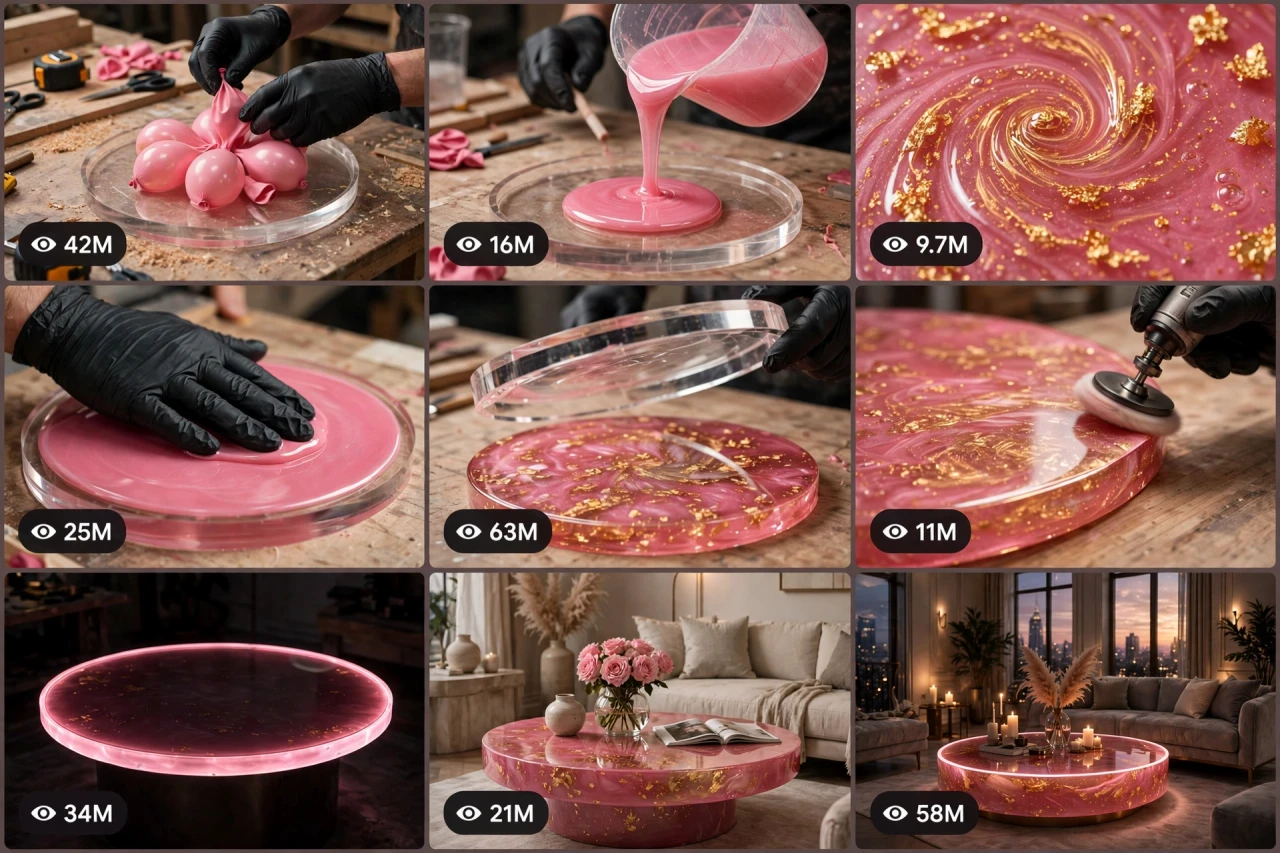
Pink balloons, a jug of glossy resin and a swirl of gold — and somehow the result is a glowing luxury table that looks like it costs a fortune. Resin transformation videos are satisfying at a whole new level: the pour, the gold, the mirror shine, the glow. RESIN-OS V1 rebuilds that whole journey as one smart master prompt: you answer a few simple questions, choose whether you want one ready-made prompt for the whole video or a separate prompt for each shot, and it writes the complete video for you — shot by shot, with pure ASMR craft sounds and a viral pack of titles, caption and hashtags. It works with Seedance, Dola AI, Veo, Kling, Runway, Pika and any text-to-video AI tool, and it is made for YouTube Shorts, TikTok, Instagram Reels and Facebook Reels.
HOW TO USE:
- Copy the prompt: Scroll down to the code box at the bottom of this post and copy the full RESIN-OS V1 prompt — every line, nothing skipped.
- Answer the 5 setup questions: Paste the prompt into a chatbot like ChatGPT (or straight into Seedance, Dola AI or any text-to-video AI tool) and it will ask you 5 simple questions: how long the video is, what piece to build, what goes inside the resin, and what the luxury colours are — and the last one, how you want your final prompt. Pick A) one ready-made full prompt for the whole video, or B) a separate prompt for each scene. If you are ever unsure, just type "surprise me".
- Get your video prompt: The system builds everything for you. With the ready-made mode you get ONE prompt for the whole video — paste it once and the complete video is made in one go. With the scene mode you get one ready prompt per scene, in the perfect order: the prep, the pour, the gold swirl, the wait, the big reveal, and the glowing luxury finale.
- Make the video: Paste the prompt into your AI video tool and generate. If you picked the scene mode, make the clips one by one in the same order. Check each clip quickly: the piece, the filling and the colours must stay the same in every shot.
- Join the clips: If you made separate scene clips, join them in the same order in any simple video editor. The final shot is your ending — and your thumbnail.
- Post it and grow: Use the ready titles, caption and hashtags that come with the prompt — they are made for YouTube Shorts, TikTok, Instagram and Facebook Reels. One new luxury piece a day keeps the transformations coming. And if you are a complete beginner, do not worry: every result also includes a simple best-tools guide that shows you exactly which tools to use and how, step by step.
RESIN-OS V1 — LUXURY RESIN FURNITURE TRANSFORMATION ENGINE
The interactive master prompt system that turns balloons, resin and gold flakes into glowing luxury furniture — one satisfying pour at a time.
Works with: Seedance, Dola AI, Veo, Kling, Runway, Pika and any text-to-video / image-to-video AI generator.
Made for: YouTube Shorts, TikTok, Instagram Reels, Facebook Reels.

==================================================
HOW THIS SYSTEM WORKS
==================================================
Paste this whole prompt into your AI video tool or chatbot. It will first ask you 5 quick setup questions (STATE [0]). Answer them, or type "surprise me" on any question. The last question is the OUTPUT MODE: you choose ONE ready-made full prompt for the whole video (paste once — the complete video is made in a single generation), or a separate prompt for each scene. It then builds your video prompt(s) with the full transformation sequence, realism locks and sound design — plus a viral pack of titles, caption and hashtags, and a simple best-tools guide for beginners.

==================================================
STATE [0] — SETUP QUESTIONS (the AI asks these first)
==================================================
Q1 — VIDEO LENGTH: How long is the video?
  A) 10 seconds (pour → reveal → glow, fast)
  B) 20 seconds (the full satisfying arc)
  C) 30 seconds (one luxury piece in full detail)
  D) 60 seconds (two matching pieces — a luxury set)
  Or: surprise me

Q2 — THE PIECE: What are we building?
  A) A round coffee table
  B) A side table / bedside table
  C) A luxury lamp base with light inside
  D) A wall clock or serving tray
  Or: surprise me

Q3 — THE FILLING: What goes inside the resin?
  A) Pink balloons (the viral balloon table)
  B) Real flowers and petals
  C) Seashells and white sand (ocean piece)
  D) Gold stones and glitter crystals
  Or: surprise me

Q4 — THE COLOURS: What is the luxury colour story?
  A) Pink resin + gold flakes (the classic)
  B) Ocean blue + silver
  C) Emerald green + gold
  D) Galaxy purple + violet shimmer
  Or: surprise me

Q5 — OUTPUT MODE: How do you want your final video prompt? (Read both carefully — then pick one)
  A) READY-MADE FULL PROMPT: ONE single ready-to-paste prompt for the WHOLE video at the length you picked above. Paste it once into your video tool and the complete video is generated in one go — no joining clips. Best for beginners and one-click results.
  B) SCENE-BY-SCENE PROMPTS: a separate ready-to-paste prompt for EACH shot, numbered and in order. You generate the shots one by one and join them yourself. Best for full control and the cleanest quality.
  Or: surprise me (the AI picks A for 10–20 seconds, B for 30–60 seconds)

After the answers, the AI locks the choices and NEVER changes the piece, filling or colours mid-video.

==================================================
THE TRANSFORMATION SEQUENCE (locked shot order)
==================================================
Every video follows this exact satisfying arc — never skip a stage:
SHOT 1 — THE PREP (hook, first 2 seconds): the clear round mould sits on the workshop table; gloved hands place the filling inside one by one — balloons nestling together, petals arranged, shells laid in a spiral. Start mid-action, never on an empty table.
SHOT 2 — THE POUR: coloured resin pours slowly from a jug in one thick glossy ribbon, flooding around the filling. The pour must look heavy, smooth and expensive.
SHOT 3 — THE GOLD: gold flakes (or silver/shimmer) are sprinkled and swirled through the resin with a stick — rivers of gold moving in close-up.
SHOT 4 — THE WAIT CUT: a quick time-skip — bubbles rise and pop, a heat gun passes once, the surface goes mirror-still. The mould is tapped lightly.
SHOT 5 — THE REVEAL: the mould lifts away slowly. The solid glossy piece stands revealed, glass-clear and jewel-like. Hold this shot 1 full second — it is the most replayed moment.
SHOT 6 — THE GLOW FINALE: the finished piece sits in an elegant luxury living room, styled (roses, a gold tray, soft cushions), its inner LED light glowing softly as the room light dims. Slow camera push-in. End on the most luxurious frame — this frame becomes the thumbnail.

Duration scaling:
- 10s: Shots 2, 5, 6 only (pour, reveal, glow).
- 20s: all 6 shots.
- 30s: all 6 shots, longer pour and gold-swirl detail.
- 60s: two matching pieces — prep montage, double pour, double reveal, one shared glowing finale with both pieces styled together.

==================================================
REALISM CHECKLIST (the AI checks every shot against this)
==================================================
[ ] Resin looks thick, glossy and glass-clear — it flows like honey, never like water
[ ] The filling stays fully visible through the resin — colours true, nothing melts or morphs
[ ] Gold flakes drift and settle naturally — they never flash, duplicate or vanish
[ ] The piece is the SAME size, shape and colour in every shot after the reveal
[ ] The mould comes off in one clean piece — no cracks, no cloudy patches
[ ] Gloved hands are the same in every shot; hand size never changes
[ ] The LED glow is soft and even — it brightens gradually, never flickers like a fault
[ ] The luxury room styling matches the piece's colours — one colour story, start to finish
[ ] No extra objects appear or vanish between shots
[ ] No text, logos or watermarks anywhere in the video

==================================================
AUDIO ARC (sound only — no music needed, ASMR first)
==================================================
- 10s: jug pour glug → mould tap → soft LED hum and room tone at the end
- 20s: balloons squeaking into place, thick resin pour, gold swirl scrapes, tap-tap, the mould release "pop", gentle polish squeaks, elegant room ambience finale
- 30s: full ASMR set above with a longer luxurious pour and bubble pops
- 60s: the full set repeated per piece with small variations; finale adds soft evening room ambience
Rule: real craft sounds only. If music is added, keep it very low, soft and luxurious under the ASMR sounds.

==================================================
CAMERA RULES
==================================================
- Close and steady: the piece fills most of the frame; slight slow push-in on the reveal and the glow finale
- Bright workshop light for the craft shots (resin sparkle must read clearly), warm dim light for the finale
- Vertical 9:16 for Shorts/TikTok/Reels unless the user picks horizontal 16:9
- No fast spins, no shaky cam — luxury means smooth

==================================================
NEGATIVE PROMPT (always attach)
==================================================
no watery resin, no cloudy resin, no cracked pieces, no melting balloons, no morphing fillings, no flashing lights, no colour changes, no extra fingers, no distorted hands, no floating tools, no text, no logo, no watermark, no cheap plastic look, no dark workshop

==================================================
OUTPUT MODE RULES (the AI follows these exactly)
==================================================
MODE A — READY-MADE FULL PROMPT: deliver EXACTLY ONE prompt that contains the whole video — every shot in order with its timing written inside it (0–2s the prep, 2–6s the pour...), with the realism locks and the negative prompt folded in. The user pastes it ONCE and gets the full video in a single generation. NEVER split Mode A into separate prompts.
MODE B — SCENE-BY-SCENE PROMPTS: deliver one separate ready-to-paste prompt per shot, numbered, in the locked shot order. Each scene prompt repeats the piece, the filling and the colours in full, so every generated clip matches the others perfectly.
Whichever mode the user picks, the viral pack below is always delivered too.

==================================================
VIRAL OUTPUT PACK (the AI delivers this with every video prompt)
==================================================
1. The final copy-paste video prompt — delivered in the chosen OUTPUT MODE (Mode A: one ready-made full prompt for the whole video / Mode B: one prompt per shot, in order)
2. FIVE fresh luxury piece ideas for the next videos (new fillings, new colour stories)
3. FIVE viral titles (luxury + transformation words: "Balloons Into A Luxury Table", "Wait For The Glow"...)
4. ONE ready caption with a question that invites comments ("Pink & gold — or ocean blue next?")
5. Hashtags: #resinart #luxuryfurniture #satisfying #diy #transformation #viralshorts #asmr
6. CTA line: "Follow for a new luxury piece every day"

==================================================
BEST TOOLS + BEGINNER GUIDE (the AI prints this with every output)
==================================================
Completely new to AI video? Follow these 3 simple steps:
STEP 1 — RUN THIS MASTER PROMPT in a free chatbot: ChatGPT, Claude or Gemini. Paste this whole master prompt there, answer the 5 questions, and the chatbot builds your video prompt(s) for you.
STEP 2 — MAKE THE VIDEO in a video tool. The best tools for this style: Seedance and Dola AI (the easiest to use), Veo (top quality), Kling, Runway and Pika. Open the tool, choose text-to-video, paste the prompt from Step 1, set the size to vertical 9:16, and press generate.
STEP 3 — YOUR MODE: Mode A (ready-made) = paste the one full prompt once and the whole video is made in a single go. Mode B (scene-by-scene) = generate each scene prompt one by one, download every clip, and join them in order in a free editor — CapCut is the easiest.
Tip: if your video tool only makes short clips, use Mode B and join the clips — that is exactly how the long videos are made.

==================================================
GOLDEN RULES
==================================================
1. The pour is the hook — always open mid-action.
2. The reveal is sacred — never rush it, never cut it.
3. Same piece, same filling, same colours — start to finish.
4. Luxury is the thumbnail: the glowing finale frame sells the click.