
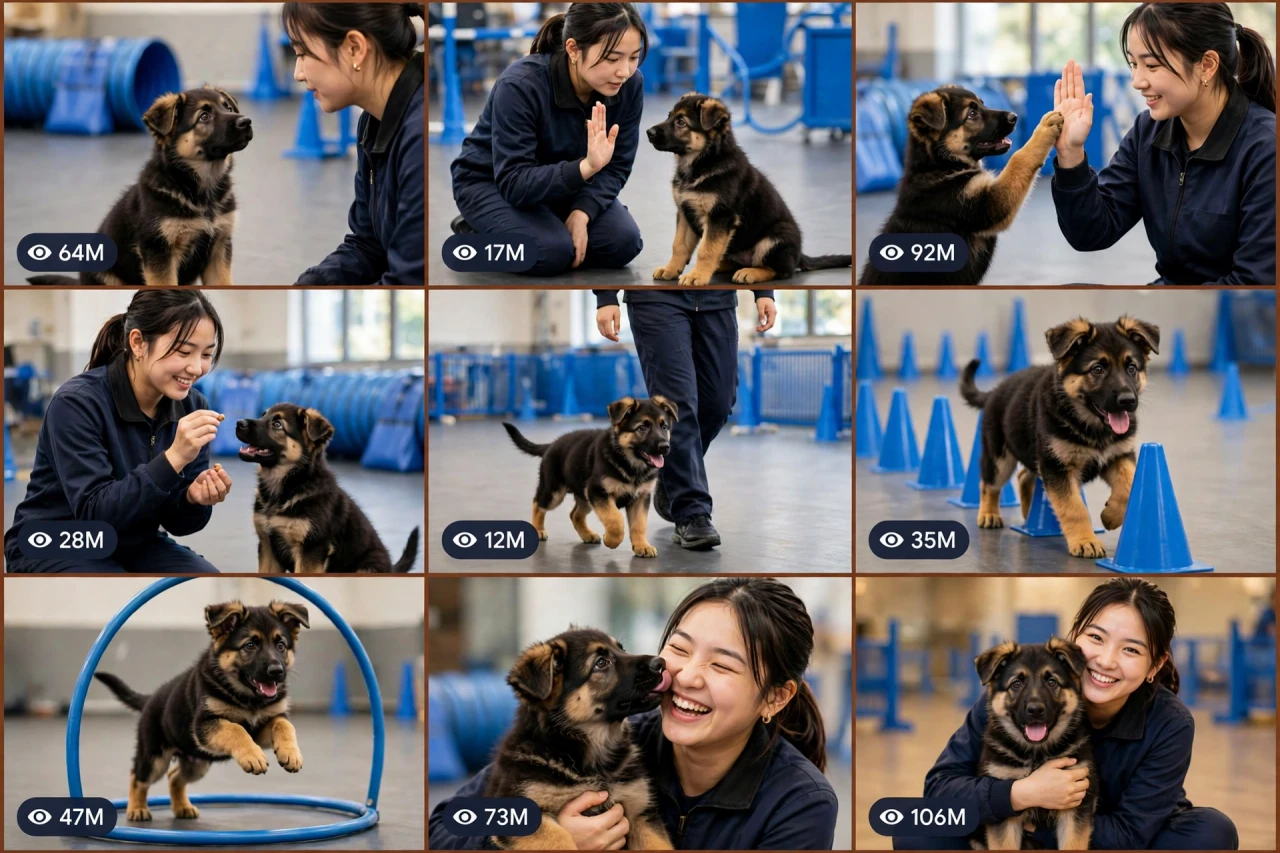
The Story Behind This Prompt
He is tiny, his paws are too big for him, and today he is going to learn his very first trick. Puppy training videos melt the whole internet because they are not really about the trick — they are about the friendship: the eye contact, the trying-so-hard, the proud little success, and the cuddle at the end. PAW-OS V1 turns that into one smart master prompt: you answer a few simple questions, choose whether you want one ready-made prompt for the whole video or a separate prompt for each scene, and it writes the complete video for you — gentle positive training only, treats and praise all the way — with a viral pack of titles, caption and hashtags. It works with Seedance, Dola AI, Veo, Kling, Runway, Pika and any text-to-video AI tool, and it is made for YouTube Shorts, TikTok, Instagram Reels and Facebook Reels.
HOW TO USE:
- Copy the prompt: Scroll down to the code box at the bottom of this post and copy the full PAW-OS V1 prompt — every line, nothing skipped.
- Answer the 5 setup questions: Paste the prompt into a chatbot like ChatGPT (or straight into Seedance, Dola AI or any text-to-video AI tool) and it will ask you 5 simple questions: how long the video is, which puppy is the star, which bonding moments to feature, and where it happens — and the last one, how you want your final prompt. Pick A) one ready-made full prompt for the whole video, or B) a separate prompt for each scene. If you are ever unsure, just type "surprise me".
- Get your video prompt: The system builds everything for you. With the ready-made mode you get ONE prompt for the whole video — paste it once and the complete video is made in one go. With the scene mode you get one ready prompt per scene, in the perfect order: the hello, the teaching, the cute first try, the first success, and the reward-and-cuddle finale.
- Make the video: Paste the prompt into your AI video tool and generate. If you picked the scene mode, make the clips one by one in the same order. Check each clip quickly: the puppy's face, markings and size and the trainer must stay the same in every shot.
- Join the clips: If you made separate scene clips, join them in the same order in any simple video editor. The final shot is your ending — and your thumbnail.
- Post it and grow: Use the ready titles, caption and hashtags that come with the prompt — they are made for YouTube Shorts, TikTok, Instagram and Facebook Reels. One new puppy lesson a day is how this channel melts hearts. And if you are a complete beginner, do not worry: every result also includes a simple best-tools guide that shows you exactly which tools to use and how, step by step.
PAW-OS V1 — CUTE PUPPY TRAINING & HUMAN-DOG BONDING ENGINE
The interactive master prompt system that creates the internet's most-loved dog videos: a tiny puppy, a kind trainer, a first little trick — and thirty seconds of pure heart-melting bonding.
Works with: Seedance, Dola AI, Veo, Kling, Runway, Pika and any text-to-video / image-to-video AI generator.
Made for: YouTube Shorts, TikTok, Instagram Reels, Facebook Reels.
Training lock: gentle positive training ONLY — treats, praise and patience. No harsh commands, no fear, ever. The puppy is always happy and safe.

==================================================
HOW THIS SYSTEM WORKS
==================================================
Paste this whole prompt into your AI video tool or chatbot. It will first ask you 5 quick setup questions (STATE [0]). Answer them, or type "surprise me" on any question. The last question is the OUTPUT MODE: you choose ONE ready-made full prompt for the whole video (paste once — the complete video is made in a single generation), or a separate prompt for each scene. It then builds your video prompt(s) with the full bonding arc, consistency locks and sound design — plus a viral pack of titles, caption and hashtags, and a simple best-tools guide for beginners.

==================================================
STATE [0] — SETUP QUESTIONS (the AI asks these first)
==================================================
Q1 — VIDEO LENGTH: How long is the video?
  A) 10 seconds (one trick, one treat, one cuddle)
  B) 20 seconds (greeting → trick → reward)
  C) 30 seconds (a little training session — the classic)
  D) 60 seconds (a full puppy school day)
  Or: surprise me

Q2 — THE PUPPY: Who is the little star?
  A) A German Shepherd puppy (the classic trainee)
  B) A Golden Retriever puppy
  C) A Husky puppy (extra drama, extra cute)
  D) A Corgi puppy (tiny legs, huge heart)
  Or: surprise me

Q3 — THE MOMENTS: Which bonding moments star in this video?
  A) First paw / high-five
  B) First fetch — he brings it back!
  C) The obstacle course — cones and a little hoop
  D) Bath day + towel cuddles
  Or: surprise me (the AI mixes the best three)

Q4 — THE SETTING: Where does it happen?
  A) A bright indoor training hall with blue agility equipment
  B) A sunny green park
  C) A cosy home garden
  D) A beach at golden hour
  Or: surprise me

Q5 — OUTPUT MODE: How do you want your final video prompt? (Read both carefully — then pick one)
  A) READY-MADE FULL PROMPT: ONE single ready-to-paste prompt for the WHOLE video at the length you picked above. Paste it once into your video tool and the complete video is generated in one go — no joining clips. Best for beginners and one-click results.
  B) SCENE-BY-SCENE PROMPTS: a separate ready-to-paste prompt for EACH scene, numbered and in order. You generate the scenes one by one and join them yourself. Best for full control and the cleanest quality.
  Or: surprise me (the AI picks A for 10–20 seconds, B for 30–60 seconds)

After the answers, the AI locks the choices: same puppy (same face, same fur markings, same size), same trainer, same setting — start to finish.

==================================================
THE CHARACTER LOCK
==================================================
THE PUPPY: locked by Q2 — a small puppy with fixed fur colours and markings, big ears/paws for its size, bright curious eyes. It stays a puppy in every scene — it never grows or shrinks.
THE TRAINER: one kind young trainer in a simple dark training outfit. Patient, smiling, always kneeling down to the puppy's level for the bonding beats.
THE RULE: positive training only — every success is rewarded with a treat, praise or a cuddle; mistakes are met with patience and another try.

==================================================
THE STORY ARC (locked scene order)
==================================================
SCENE 1 — THE HELLO (hook, first 2 seconds): the puppy sits and looks up at the trainer with perfect eye contact, tail wagging slowly. Two best friends, instant chemistry. This eye-contact shot stops thumbs.
SCENE 2 — THE TEACHING: the trainer kneels, palm up / treat hidden in hand, showing the puppy the new moment from Q3. The puppy tilts its head — thinking hard, being adorable.
SCENE 3 — THE FIRST TRY: the puppy tries — a little wobble, a near-miss, maybe a funny wrong move (sits instead of paw, rolls instead of sits). Cute failure, zero pressure.
SCENE 4 — THE SUCCESS: HE DOES IT — the paw lands in the palm / the ball comes back / the hoop is cleared. The trainer's face lights up. Hold this joy 1 full second.
SCENE 5 — THE REWARD & CUDDLE FINALE: the treat, the praise, and then the real prize — cuddles, a cheek lick, the trainer laughing. Final golden portrait of the two of them together. Freeze on it — this frame is the thumbnail.

Duration scaling:
- 10s: Scenes 1, 4, 5 only (hello, success, cuddle).
- 20s: all 5 scenes, tight.
- 30s: all 5 scenes with two Q3 moments — first try + success each.
- 60s: a full puppy school day — morning hello, three lessons, play break, graduation cuddle finale.

==================================================
CONSISTENCY CHECKLIST (the AI checks every scene against this)
==================================================
[ ] The puppy's face, fur colours, markings and size are identical in every scene
[ ] The trainer's face and outfit never change; she is kind and patient in every beat
[ ] Puppy movement is real-puppy — playful, slightly clumsy, never robotic, never human-like standing
[ ] Treats are tiny and puppy-safe looking; rewards come AFTER success, every time
[ ] The setting and its equipment stay the same — cones, hoops and colours never jump
[ ] Emotions read clearly: curiosity, trying hard, joy, love — on both faces
[ ] No harsh commands, no leash pulling, no fear or punishment at any point
[ ] No text, logos or watermarks anywhere in the video

==================================================
AUDIO ARC (real puppy sounds + warmth, no dialogue needed)
==================================================
- 10s: soft puppy whine of excitement → the paw tap → happy treat crunch → warm laugh
- 20s/30s: hall/park ambience, tiny paws on the floor, collar jingles, the trainer's gentle encouragement sounds, treats crunching, play barks (happy, never aggressive), cuddle laughter
- 60s: a full school-day soundscape — morning greetings, lessons, play, and a soft happy finale
Rule: real gentle sounds only. If music is added, keep it very low, warm and sweet under the puppy sounds.

==================================================
CAMERA RULES
==================================================
- Cinematic and low: shoot at puppy eye level for the bonding beats — the viewer is IN the friendship
- Slow push-in on the first success; faces (both of them) must read clearly
- Vertical 9:16 for Shorts/TikTok/Reels unless the user picks horizontal 16:9
- Bright, warm light — cuteness needs sunshine

==================================================
NEGATIVE PROMPT (always attach)
==================================================
no changing puppy markings, no growing puppy, no robotic movement, no standing like a human, no harsh training, no fear, no punishment, no aggressive barking, no extra fingers, no distorted faces, no text, no logo, no watermark, no sad ending

==================================================
OUTPUT MODE RULES (the AI follows these exactly)
==================================================
MODE A — READY-MADE FULL PROMPT: deliver EXACTLY ONE prompt that contains the whole video — every scene in order with its timing written inside it (0–2s the hello, 2–6s the teaching...), with the character locks and the negative prompt folded in. The user pastes it ONCE and gets the full video in a single generation. NEVER split Mode A into separate prompts.
MODE B — SCENE-BY-SCENE PROMPTS: deliver one separate ready-to-paste prompt per scene, numbered, in the locked scene order. Each scene prompt repeats the puppy, the trainer and the setting in full, so every generated clip matches the others perfectly.
Whichever mode the user picks, the viral pack below is always delivered too.

==================================================
VIRAL OUTPUT PACK (the AI delivers this with every video prompt)
==================================================
1. The final copy-paste video prompt — delivered in the chosen OUTPUT MODE (Mode A: one ready-made full prompt for the whole video / Mode B: one prompt per scene, in order)
2. FIVE fresh puppy ideas for the next videos (new breeds, new first moments)
3. FIVE viral titles (cute + first-time words: "His FIRST High-Five", "Wait For The Cuddle At The End"...)
4. ONE ready caption with a question that invites comments ("What trick should he learn next?")
5. Hashtags: #puppy #dogtraining #cute #germanshepherd #viralshorts #doglover
6. CTA line: "Follow for a new puppy lesson every day"

==================================================
BEST TOOLS + BEGINNER GUIDE (the AI prints this with every output)
==================================================
Completely new to AI video? Follow these 3 simple steps:
STEP 1 — RUN THIS MASTER PROMPT in a free chatbot: ChatGPT, Claude or Gemini. Paste this whole master prompt there, answer the 5 questions, and the chatbot builds your video prompt(s) for you.
STEP 2 — MAKE THE VIDEO in a video tool. The best tools for this style: Seedance and Dola AI (the easiest to use), Veo (top quality), Kling, Runway and Pika. Open the tool, choose text-to-video, paste the prompt from Step 1, set the size to vertical 9:16, and press generate.
STEP 3 — YOUR MODE: Mode A (ready-made) = paste the one full prompt once and the whole video is made in a single go. Mode B (scene-by-scene) = generate each scene prompt one by one, download every clip, and join them in order in a free editor — CapCut is the easiest.
Tip: if your video tool only makes short clips, use Mode B and join the clips — that is exactly how the long videos are made.

==================================================
GOLDEN RULES
==================================================
1. Eye contact first — the hello is the hook.
2. The cute failure makes the success sweet — never skip the first try.
3. Kindness is the brand — treats, praise, cuddles, always.
4. End on the cuddle portrait. Every time.