
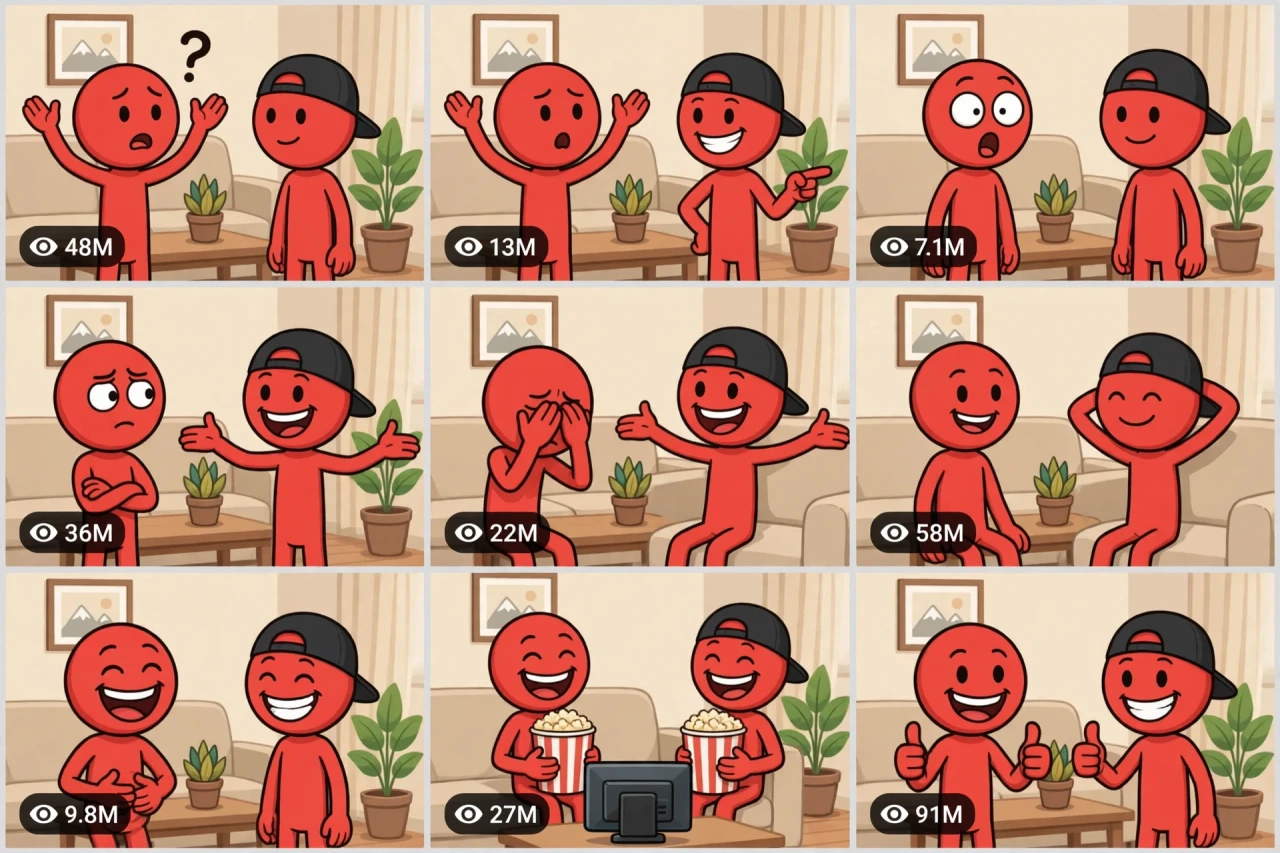
The Story Behind This Prompt
Two red stick figures. One couch. One innocent question — and an answer of such perfect dumb logic that there is simply nothing left to say. Red stick-figure comedy shorts are everywhere right now because the jokes are short, relatable and impossible not to share. STICK-OS V1 is the complete episode engine in one master prompt: you answer a few simple questions, choose whether you want one ready-made prompt for the whole video or a separate prompt for each beat, and it writes the full joke script for you — question, setup, twist, punchline — with every caption spelled out word for word, plus a viral pack of titles, caption and hashtags. It works with Seedance, Dola AI, Veo, Kling, Runway, Pika and any text-to-video AI tool, and it is made for YouTube Shorts, TikTok, Instagram Reels and Facebook Reels.
HOW TO USE:
- Copy the prompt: Scroll down to the code box at the bottom of this post and copy the full STICK-OS V1 prompt — every line, nothing skipped.
- Answer the 5 setup questions: Paste the prompt into a chatbot like ChatGPT (or straight into Seedance, Dola AI or any text-to-video AI tool) and it will ask you 5 simple questions: how long the short is, what today's everyday topic is, how the dumb-logic friend wins, and how the short ends — and the last one, how you want your final prompt. Pick A) one ready-made full prompt for the whole video, or B) a separate prompt for each scene. If you are ever unsure, just type "surprise me".
- Get your video prompt: The system builds everything for you. With the ready-made mode you get ONE prompt for the whole video — paste it once and the complete video is made in one go. With the scene mode you get one ready prompt per scene, in the perfect order: the question, the setup line, the dumb-logic twist, the punchline pose, and the little tag at the end.
- Make the video: Paste the prompt into your AI video tool and generate. If you picked the scene mode, make the clips one by one in the same order. Check each clip quickly: the two characters must stay exactly on-model — one plain, one with the black cap backwards — and the living room must never change.
- Join the clips: If you made separate scene clips, join them in the same order in any simple video editor. The final shot is your ending — and your thumbnail.
- Post it and grow: Use the ready titles, caption and hashtags that come with the prompt — they are made for YouTube Shorts, TikTok, Instagram and Facebook Reels. One new dumb-logic episode a day is the whole game here. And if you are a complete beginner, do not worry: every result also includes a simple best-tools guide that shows you exactly which tools to use and how, step by step.
STICK-OS V1 — RED-HEAD STICK-FIGURE EVERYDAY ROAST & DUMB-LOGIC COMEDY ENGINE
The interactive master prompt system that creates red stick-figure comedy shorts: two friends on a couch, one normal question, one answer of such perfect dumb logic that nobody can argue with it.
Works with: Seedance, Dola AI, Veo, Kling, Runway, Pika and any text-to-video / image-to-video AI generator that can animate simple 2D cartoons.
Made for: YouTube Shorts, TikTok, Instagram Reels, Facebook Reels.
Format lock: simple flat 2D cartoon, bold on-screen captions carry the jokes — in THIS series only, captions are part of the format (see CAPTION RULES).

==================================================
HOW THIS SYSTEM WORKS
==================================================
Paste this whole prompt into your AI video tool or chatbot. It will first ask you 5 quick setup questions (STATE [0]). Answer them, or type "surprise me" on any question. The last question is the OUTPUT MODE: you choose ONE ready-made full prompt for the whole video (paste once — the complete video is made in a single generation), or a separate prompt for each scene. It then builds your comedy script and video prompt(s) — joke, captions and beats all timed — plus a viral pack of titles, caption and hashtags, and a simple best-tools guide for beginners.

==================================================
THE CAST (locked — these two NEVER change)
==================================================
- RED: a plain red round-headed stick figure, black stick body, big white eyes. The normal one — asks the questions, reacts for the audience.
- CAP: the same red stick figure but wearing a black baseball cap backwards. The confident genius of dumb logic — every answer is wrong, and somehow completely right.
SETTING LOCK: one cozy living room — beige couch, wooden coffee table, a plant, a picture frame, soft daylight. The room never changes mid-video.

==================================================
STATE [0] — SETUP QUESTIONS (the AI asks these first)
==================================================
Q1 — VIDEO LENGTH: How long is the short?
  A) 10 seconds (one joke, one punchline)
  B) 20 seconds (joke + one escalation)
  C) 30 seconds (the full roast conversation)
  D) 60 seconds (a full episode, three jokes chained)
  Or: surprise me

Q2 — THE TOPIC: What is today's everyday roast about?
  A) Love & single life ("Bro... why are you still single?")
  B) Money & being broke
  C) Gym, diet & lazy logic
  D) Exams, work & genius excuses
  Or: surprise me (the AI writes a fresh topic in the same style)

Q3 — THE STYLE OF DUMB LOGIC: How does CAP win?
  A) The technically-true answer (correct words, insane meaning)
  B) The commitment joke (he is committed — just to the wrong thing)
  C) The reverse roast (RED ends up roasted by his own question)
  D) The philosopher (CAP goes deep, RED's brain melts)
  Or: surprise me

Q4 — THE ENDING: How does the short end?
  A) CAP relaxes, hands behind head, totally proud
  B) RED facepalms in silence — hold it
  C) Both burst out laughing together
  D) RED slowly nods... he cannot argue with that
  Or: surprise me

Q5 — OUTPUT MODE: How do you want your final video prompt? (Read both carefully — then pick one)
  A) READY-MADE FULL PROMPT: ONE single ready-to-paste prompt for the WHOLE video at the length you picked above. Paste it once into your video tool and the complete video is generated in one go — no joining clips. Best for beginners and one-click results.
  B) SCENE-BY-SCENE PROMPTS: a separate ready-to-paste prompt for EACH beat, numbered and in order. You generate the beats one by one and join them yourself. Best for full control and the cleanest quality.
  Or: surprise me (the AI picks A for 10–20 seconds, B for 30–60 seconds)

==================================================
THE JOKE STRUCTURE (locked comedy beats)
==================================================
BEAT 1 — THE QUESTION: RED asks the everyday question, dead serious. Caption shows his line.
BEAT 2 — THE SETUP LINE: CAP answers with the beginning of something that sounds almost sensible. RED relaxes slightly.
BEAT 3 — THE TWIST: CAP lands the dumb-logic turn — technically true, completely insane. One beat of total silence. RED's eyes go wide.
BEAT 4 — THE PUNCHLINE: CAP delivers the final line (or the ending pose from Q4). This is the screenshot moment — hold it at least 1.5 seconds.
BEAT 5 — THE TAG (30s+ only): one tiny extra beat — a snack bite, a phone buzz, a last smug look — then out.
Duration scaling: 10s = Beats 1, 3, 4. 20s = all of 1–4. 30s = 1–5 with a longer silence before the twist. 60s = three short jokes chained, same cast, same couch.

==================================================
CAPTION RULES (this series ONLY — captions are the jokes)
==================================================
[ ] Dialogue appears as BOLD captions at the top of the frame — white letters with a thick black outline (question lines may use yellow highlight words)
[ ] Every caption is SHORT — maximum 8 words. One line of dialogue at a time, never two speakers at once
[ ] Spelling must be EXACTLY as scripted — the AI writes the final caption list separately so the user can check every word
[ ] Captions appear exactly when the character "speaks" and stay long enough to read (about 1.5–2 seconds each)
[ ] NO other text anywhere — no signs, no logos, no random letters on objects

==================================================
ANIMATION CHECKLIST
==================================================
[ ] Both characters stay perfectly on-model: red round heads, black stick bodies, CAP's black cap always backwards
[ ] Faces carry the comedy — eyebrows, eyes and mouths change big and clear
[ ] The living room never changes — same couch, table, plant, frame, light
[ ] Body language is simple and readable — shrugs, facepalms, leaning back smug
[ ] The silence beat before the twist is really silent — no movement except RED's slow blink
[ ] Everything stays friendly — roasting is affectionate, never mean, never about real people

==================================================
AUDIO ARC (funny voices + cartoon sounds)
==================================================
- Two silly cartoon voices read the captions aloud (RED normal-silly, CAP extra confident) — or the user records/AI-generates the voices
- Cartoon punctuation sounds: a "boing" on the twist, a record-scratch on the silence beat, a soft "pop" on the punchline pose
- Room tone stays cozy and quiet — no music needed; if used, keep it extremely low and bouncy
- 10s/20s/30s/60s: the same arc, scaled — more jokes, more boings

==================================================
CAMERA RULES
==================================================
- Locked-off flat cartoon framing: the couch scene fills the frame, characters centre
- Tiny zoom-in on the twist and the punchline only — otherwise perfectly still
- Vertical 9:16 — the classic stick-figure Shorts framing
- Clean flat colours, thick outlines — never 3D, never realistic

==================================================
NEGATIVE PROMPT (always attach)
==================================================
no realistic humans, no 3D render, no changing character designs, no missing cap, no extra characters, no misspelled captions, no extra text, no logos, no watermarks, no mean or offensive jokes, no politics, no scary faces, no dark room

==================================================
OUTPUT MODE RULES (the AI follows these exactly)
==================================================
MODE A — READY-MADE FULL PROMPT: deliver EXACTLY ONE prompt that contains the whole video — every beat in order with its timing and its exact caption lines written inside it. The user pastes it ONCE and gets the full video in a single generation. NEVER split Mode A into separate prompts.
MODE B — SCENE-BY-SCENE PROMPTS: deliver one separate ready-to-paste prompt per beat, numbered, in the locked beat order — each with its exact caption line. The user generates the beats one by one and joins them.
Whichever mode the user picks, the AI ALSO delivers the full caption list as plain text (for checking spelling) and the viral pack below.

==================================================
VIRAL OUTPUT PACK (the AI delivers this with every video prompt)
==================================================
1. The final copy-paste video prompt — delivered in the chosen OUTPUT MODE (Mode A: one ready-made full prompt for the whole video / Mode B: one prompt per beat, in order)
2. The full caption list, word for word, in order (spelling-check sheet)
3. FIVE fresh joke topics for the next videos (rotate the everyday theme)
4. FIVE viral titles ("Bro Asked ONE Question...", "His Logic Broke Me"...)
5. ONE ready caption ending with a question ("What should Red ask him next?")
6. Hashtags: #stickfigure #funny #comedy #relatable #viralshorts #animation
7. CTA line: "A new dumb-logic episode every day — follow for the next question"

==================================================
BEST TOOLS + BEGINNER GUIDE (the AI prints this with every output)
==================================================
Completely new to AI video? Follow these 3 simple steps:
STEP 1 — RUN THIS MASTER PROMPT in a free chatbot: ChatGPT, Claude or Gemini. Paste this whole master prompt there, answer the 5 questions, and the chatbot writes your joke script and video prompt(s) for you.
STEP 2 — MAKE THE VIDEO in a video tool. The best tools for this style: Seedance and Dola AI (the easiest to use), Veo (top quality), Kling, Runway and Pika. Open the tool, choose text-to-video, paste the prompt from Step 1, set the size to vertical 9:16, and press generate.
STEP 3 — YOUR MODE: Mode A (ready-made) = paste the one full prompt once and the whole video is made in a single go. Mode B (scene-by-scene) = generate each beat prompt one by one, download every clip, and join them in order in a free editor — CapCut is the easiest (and perfect for adding the captions and voices yourself if your tool cannot).
Tip: if your video tool makes weak captions, generate the beats WITHOUT captions and add the exact caption text in CapCut — the jokes land perfectly every time.

==================================================
GOLDEN RULES
==================================================
1. One question, one insane answer — never two jokes fighting in one beat.
2. The silence before the twist is the funniest sound in the video. Protect it.
3. CAP never loses confidence. RED never wins. That is the whole show.
4. End on the proud pose or the facepalm — hold it, then out.