
The Story Behind This Prompt
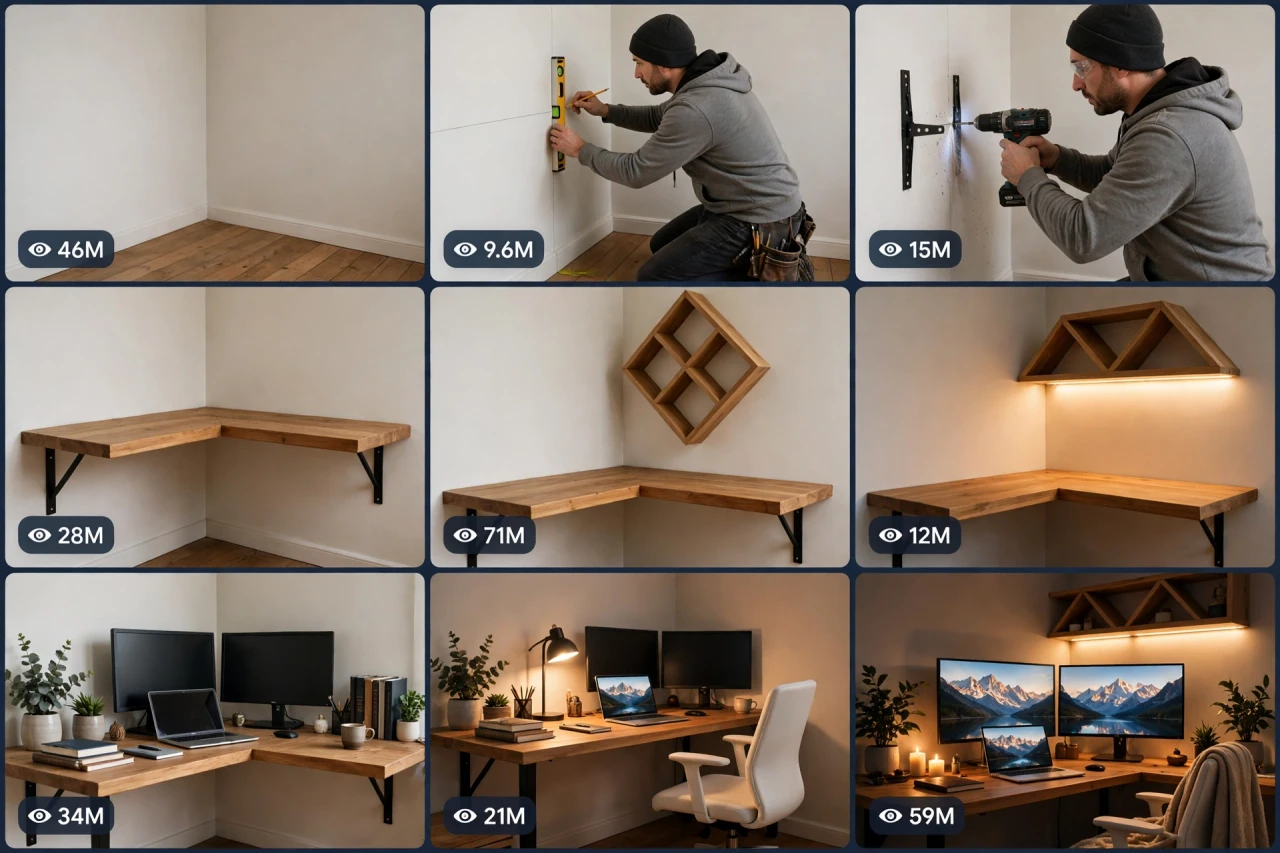
Every home has that one corner: empty, dusty, completely wasted. These transformation videos take that exact corner and — brackets, wood, warm light, plants — turn it into the desk setup of your dreams. CORNER-OS V1 rebuilds the makeover as one smart master prompt: you answer a few simple questions, choose whether you want one ready-made prompt for the whole video or a separate prompt for each shot, and it writes the complete video for you — with the golden rule built in: the same corner, at the same angle, before and after — plus a viral pack of titles, caption and hashtags. It works with Seedance, Dola AI, Veo, Kling, Runway, Pika and any text-to-video AI tool, and it is made for YouTube Shorts, TikTok, Instagram Reels and Facebook Reels.
HOW TO USE:
- Copy the prompt: Scroll down to the code box at the bottom of this post and copy the full CORNER-OS V1 prompt — every line, nothing skipped.
- Answer the 5 setup questions: Paste the prompt into a chatbot like ChatGPT (or straight into Seedance, Dola AI or any text-to-video AI tool) and it will ask you 5 simple questions: how long the video is, what the corner becomes, what style it gets, and what the wow piece is — and the last one, how you want your final prompt. Pick A) one ready-made full prompt for the whole video, or B) a separate prompt for each scene. If you are ever unsure, just type "surprise me".
- Get your video prompt: The system builds everything for you. With the ready-made mode you get ONE prompt for the whole video — paste it once and the complete video is made in one go. With the scene mode you get one ready prompt per scene, in the perfect order: the empty corner, the build beginning, the structure, the light, the styling, and the evening reveal.
- Make the video: Paste the prompt into your AI video tool and generate. If you picked the scene mode, make the clips one by one in the same order. Check each clip quickly: it must be the same corner of the same room in every shot, and nothing once placed may jump or vanish.
- Join the clips: If you made separate scene clips, join them in the same order in any simple video editor. The final shot is your ending — and your thumbnail.
- Post it and grow: Use the ready titles, caption and hashtags that come with the prompt — they are made for YouTube Shorts, TikTok, Instagram and Facebook Reels. One new corner glow-up a day is the whole game here. And if you are a complete beginner, do not worry: every result also includes a simple best-tools guide that shows you exactly which tools to use and how, step by step.
CORNER-OS V1 — DIY WORKSPACE & ROOM-CORNER TRANSFORMATION ENGINE
The interactive master prompt system that turns one empty, forgotten room corner into a dream workspace — brackets, wood, warm light, done — in the makeover format the whole internet loves.
Works with: Seedance, Dola AI, Veo, Kling, Runway, Pika and any text-to-video / image-to-video AI generator.
Made for: YouTube Shorts, TikTok, Instagram Reels, Facebook Reels.

==================================================
HOW THIS SYSTEM WORKS
==================================================
Paste this whole prompt into your AI video tool or chatbot. It will first ask you 5 quick setup questions (STATE [0]). Answer them, or type "surprise me" on any question. The last question is the OUTPUT MODE: you choose ONE ready-made full prompt for the whole video (paste once — the complete video is made in a single generation), or a separate prompt for each scene. It then builds your video prompt(s) with the full transformation sequence, realism locks and sound design — plus a viral pack of titles, caption and hashtags, and a simple best-tools guide for beginners.

==================================================
STATE [0] — SETUP QUESTIONS (the AI asks these first)
==================================================
Q1 — VIDEO LENGTH: How long is the video?
  A) 10 seconds (empty → built → glowing, fast cuts)
  B) 20 seconds (the full satisfying arc)
  C) 30 seconds (one corner in full detail)
  D) 60 seconds (the corner + a matching second zone — reading nook or shelves wall)
  Or: surprise me

Q2 — THE PURPOSE: What is the corner becoming?
  A) A work-from-home desk setup
  B) A gaming battlestation
  C) A study corner for a student
  D) A beauty/makeup vanity corner
  Or: surprise me

Q3 — THE STYLE: What is the look?
  A) Warm wood + plants (the classic)
  B) White minimal and bright
  C) Dark and moody with neon accents
  D) Cosy cottage — soft colours, fairy lights
  Or: surprise me

Q4 — THE WOW PIECE: What is the signature element?
  A) A diamond/triangle-shaped wooden shelf unit
  B) Floating shelves with warm LED strips
  C) A pegboard wall for tools and gear
  D) A big plant shelf with trailing vines
  Or: surprise me

Q5 — OUTPUT MODE: How do you want your final video prompt? (Read both carefully — then pick one)
  A) READY-MADE FULL PROMPT: ONE single ready-to-paste prompt for the WHOLE video at the length you picked above. Paste it once into your video tool and the complete video is generated in one go — no joining clips. Best for beginners and one-click results.
  B) SCENE-BY-SCENE PROMPTS: a separate ready-to-paste prompt for EACH shot, numbered and in order. You generate the shots one by one and join them yourself. Best for full control and the cleanest quality.
  Or: surprise me (the AI picks A for 10–20 seconds, B for 30–60 seconds)

After the answers, the AI locks the choices. THE CORNER RULE: it is the same corner of the same room in every shot — same walls, same floor, same window light direction. The before and after must line up perfectly.

==================================================
THE TRANSFORMATION SEQUENCE (locked shot order)
==================================================
SHOT 1 — THE EMPTY CORNER (hook, first 2 seconds): the bare corner in flat light — dust, emptiness, zero personality. The maker walks in, looks at it, and smiles. The worse it looks, the better the video.
SHOT 2 — THE BUILD BEGINS: measuring, pencil marks, the drill — brackets go into the walls one by one. Fast, competent, satisfying.
SHOT 3 — THE STRUCTURE: the desk top is mounted, the wow piece (Q4) is lifted into place and fixed. The corner suddenly has a skeleton.
SHOT 4 — THE LIGHT: LED strips / lamps are fitted and tested — the first warm glow changes everything.
SHOT 5 — THE STYLING: screens, laptop, plants, books, chair — everything lands in its place in quick satisfying beats. Cables are tidy. The chair rolls in last.
SHOT 6 — THE REVEAL FINALE: the same camera angle as Shot 1 — but now it is evening and the corner glows like a magazine photo. The maker sits down, leans back, and smiles. Slow push-in. This frame is the thumbnail.

Duration scaling:
- 10s: Shots 1, 3, 6 only (empty, structure, reveal).
- 20s: all 6 shots.
- 30s: all 6 shots, longer build detail and styling beats.
- 60s: the corner plus a second matching zone built in the same style, one shared evening reveal.

==================================================
REALISM CHECKLIST (the AI checks every shot against this)
==================================================
[ ] The corner geometry never changes — same walls, floor, skirting and light direction
[ ] Every object, once placed, stays placed — nothing jumps, floats or vanishes
[ ] The desk and shelves are level, solid and properly mounted — no wobbling
[ ] The maker is the same person in the same clothes in every shot
[ ] Tools are used correctly and safely — drill, level and screws look real
[ ] LED light is warm and even — it switches on gradually in the test, never flashes
[ ] Screens show calm generic wallpapers — no real logos, no readable text
[ ] The styling grows in the locked order — structure, light, objects, chair
[ ] No text, logos or watermarks anywhere in the video

==================================================
AUDIO ARC (sound only — no music needed, ASMR first)
==================================================
- 10s: drill whirr → wood knock → LED click → evening room tone
- 20s: pencil scratches, tape measure snap, drill bursts, screwdriver turns, wood sliding into place, soft LED hum, chair rolling, a happy sigh at the end
- 30s: the full ASMR set with longer build passages
- 60s: the full set across both zones; the reveal gets one soft shared hush
Rule: real tool and room sounds only. If music is added, keep it very low, warm and calm under the ASMR sounds.

==================================================
CAMERA RULES
==================================================
- Locked tripod angle for Shots 1 and 6 — the before/after match is the whole trick
- Close steady shots for the build details; one slow push-in on the reveal
- Bright honest light while building; warm evening light for the finale
- Vertical 9:16 for Shorts/TikTok/Reels unless the user picks horizontal 16:9

==================================================
NEGATIVE PROMPT (always attach)
==================================================
no changing room layout, no moving walls, no floating furniture, no wobbling desk, no wrong tool use, no extra fingers, no distorted hands, no messy cables in the finale, no readable screen text, no logos, no watermark, no dark scary mood

==================================================
OUTPUT MODE RULES (the AI follows these exactly)
==================================================
MODE A — READY-MADE FULL PROMPT: deliver EXACTLY ONE prompt that contains the whole video — every shot in order with its timing written inside it (0–2s the empty corner, 2–6s the build begins...), with the corner lock and the negative prompt folded in. The user pastes it ONCE and gets the full video in a single generation. NEVER split Mode A into separate prompts.
MODE B — SCENE-BY-SCENE PROMPTS: deliver one separate ready-to-paste prompt per shot, numbered, in the locked shot order. Each scene prompt repeats the corner, the style and the build stage in full, so every generated clip matches the others perfectly.
Whichever mode the user picks, the viral pack below is always delivered too.

==================================================
VIRAL OUTPUT PACK (the AI delivers this with every video prompt)
==================================================
1. The final copy-paste video prompt — delivered in the chosen OUTPUT MODE (Mode A: one ready-made full prompt for the whole video / Mode B: one prompt per shot, in order)
2. FIVE fresh corner ideas for the next videos (new purposes, new styles)
3. FIVE viral titles (empty-to-dream words: "This Corner Was USELESS", "Wait For The Evening Shot"...)
4. ONE ready caption with a question that invites comments ("Warm wood — or white minimal next?")
5. Hashtags: #workspace #roommakeover #diy #desksetup #transformation #viralshorts #asmr
6. CTA line: "Follow for a new corner glow-up every day"

==================================================
BEST TOOLS + BEGINNER GUIDE (the AI prints this with every output)
==================================================
Completely new to AI video? Follow these 3 simple steps:
STEP 1 — RUN THIS MASTER PROMPT in a free chatbot: ChatGPT, Claude or Gemini. Paste this whole master prompt there, answer the 5 questions, and the chatbot builds your video prompt(s) for you.
STEP 2 — MAKE THE VIDEO in a video tool. The best tools for this style: Seedance and Dola AI (the easiest to use), Veo (top quality), Kling, Runway and Pika. Open the tool, choose text-to-video, paste the prompt from Step 1, set the size to vertical 9:16, and press generate.
STEP 3 — YOUR MODE: Mode A (ready-made) = paste the one full prompt once and the whole video is made in a single go. Mode B (scene-by-scene) = generate each scene prompt one by one, download every clip, and join them in order in a free editor — CapCut is the easiest.
Tip: if your video tool only makes short clips, use Mode B and join the clips — that is exactly how the long videos are made.

==================================================
GOLDEN RULES
==================================================
1. The emptier the start, the bigger the reveal — never pretty-up Shot 1.
2. Same corner, same angle, before and after — that match is the magic.
3. The chair rolls in last. It is the full stop of the story.
4. End on the evening glow. Every time.