
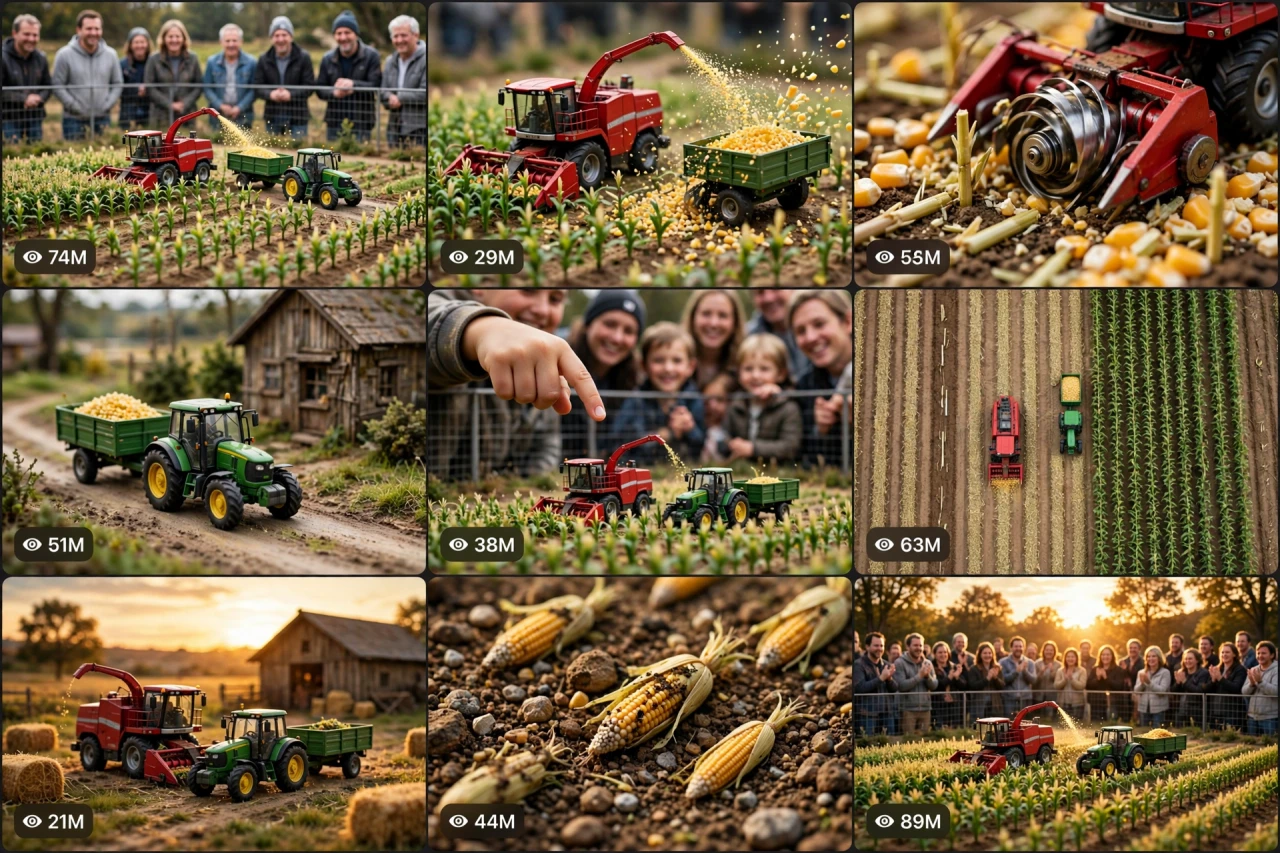
The Story Behind This Prompt
At first it looks like a normal working farm — a harvester cutting corn, a tractor hauling a full trailer. Then a giant hand enters the frame... and your brain flips: the whole farm is TINY, and every detail of it looks completely real. Miniature-world videos are pure brain candy, and MINI-OS V1 rebuilds the magic as one smart master prompt: you answer a few simple questions, choose whether you want one ready-made prompt for the whole video or a separate prompt for each scene, and it writes the complete video for you — the scale-flip hook, the working machines, the macro magic, and the golden reveal — with a viral pack of titles, caption and hashtags. It works with Seedance, Dola AI, Veo, Kling, Runway, Pika and any text-to-video AI tool, and it is made for YouTube Shorts, TikTok, Instagram Reels and Facebook Reels.
HOW TO USE:
- Copy the prompt: Scroll down to the code box at the bottom of this post and copy the full MINI-OS V1 prompt — every line, nothing skipped.
- Answer the 5 setup questions: Paste the prompt into a chatbot like ChatGPT (or straight into Seedance, Dola AI or any text-to-video AI tool) and it will ask you 5 simple questions: how long the video is, which tiny world to build, which machines star in it, and how the video proves the tiny scale — and the last one, how you want your final prompt. Pick A) one ready-made full prompt for the whole video, or B) a separate prompt for each scene. If you are ever unsure, just type "surprise me".
- Get your video prompt: The system builds everything for you. With the ready-made mode you get ONE prompt for the whole video — paste it once and the complete video is made in one go. With the scene mode you get one ready prompt per scene, in the perfect order: the impossible wide shot, the work beginning, the macro magic, the journey, and the golden finale.
- Make the video: Paste the prompt into your AI video tool and generate. If you picked the scene mode, make the clips one by one in the same order. Check each clip quickly: the machines, their colours and the tiny scale must stay the same in every shot, and everything must look real — never like a toy.
- Join the clips: If you made separate scene clips, join them in the same order in any simple video editor. The final shot is your ending — and your thumbnail.
- Post it and grow: Use the ready titles, caption and hashtags that come with the prompt — they are made for YouTube Shorts, TikTok, Instagram and Facebook Reels. One new tiny world a day keeps the wonder coming. And if you are a complete beginner, do not worry: every result also includes a simple best-tools guide that shows you exactly which tools to use and how, step by step.
MINI-OS V1 — HYPER-REAL MINIATURE WORLD ENGINE
The interactive master prompt system that creates the miniature-world videos nobody can stop watching: a whole tiny farm that looks 100 percent real — tiny machines working real tiny fields while amazed crowds watch.
Works with: Seedance, Dola AI, Veo, Kling, Runway, Pika and any text-to-video / image-to-video AI generator.
Made for: YouTube Shorts, TikTok, Instagram Reels, Facebook Reels.
Reality lock: the miniature world must look photographically REAL — real materials, real light, real scale physics. The magic is that it is tiny, not that it is fake.

==================================================
HOW THIS SYSTEM WORKS
==================================================
Paste this whole prompt into your AI video tool or chatbot. It will first ask you 5 quick setup questions (STATE [0]). Answer them, or type "surprise me" on any question. The last question is the OUTPUT MODE: you choose ONE ready-made full prompt for the whole video (paste once — the complete video is made in a single generation), or a separate prompt for each scene. It then builds your video prompt(s) with the full miniature sequence, realism locks and sound design — plus a viral pack of titles, caption and hashtags, and a simple best-tools guide for beginners.

==================================================
STATE [0] — SETUP QUESTIONS (the AI asks these first)
==================================================
Q1 — VIDEO LENGTH: How long is the video?
  A) 10 seconds (one machine working + crowd wonder)
  B) 20 seconds (the full tiny working day)
  C) 30 seconds (the complete harvest story)
  D) 60 seconds (a whole tiny season — planting to harvest)
  Or: surprise me

Q2 — THE TINY WORLD: Which miniature world are we in?
  A) A miniature farm (the classic)
  B) A miniature construction site
  C) A miniature harbour with tiny boats and cranes
  D) A miniature village with a tiny train
  Or: surprise me

Q3 — THE STAR MACHINES: What works in this world?
  A) A red forage harvester + a green tractor with trailer (farm classic)
  B) Tiny excavators and dump trucks
  C) A tiny crane loading a tiny cargo boat
  D) A miniature steam train on a countryside line
  Or: surprise me (match the Q2 world)

Q4 — THE SCALE PROOF: How do we show it is tiny?
  A) A real crowd watching behind a fence
  B) A giant human hand pointing / giving a thumbs-up beside the machines
  C) A real coin or matchbox standing next to the machines
  D) A normal-sized cat watching the tiny world like a giant
  Or: surprise me

Q5 — OUTPUT MODE: How do you want your final video prompt? (Read both carefully — then pick one)
  A) READY-MADE FULL PROMPT: ONE single ready-to-paste prompt for the WHOLE video at the length you picked above. Paste it once into your video tool and the complete video is generated in one go — no joining clips. Best for beginners and one-click results.
  B) SCENE-BY-SCENE PROMPTS: a separate ready-to-paste prompt for EACH scene, numbered and in order. You generate the scenes one by one and join them yourself. Best for full control and the cleanest quality.
  Or: surprise me (the AI picks A for 10–20 seconds, B for 30–60 seconds)

After the answers, the AI locks the choices: same miniature world, same machines (same colours), same scale — start to finish.

==================================================
THE MINIATURE SEQUENCE (locked scene order)
==================================================
SCENE 1 — THE IMPOSSIBLE WIDE (hook, first 2 seconds): what looks like a real working farm/harbour/site — until the Q4 scale proof enters the frame and the brain flips: it is all TINY. This flip is the hook.
SCENE 2 — THE WORK BEGINS: the star machines start their real job — cutting, digging, loading, hauling — with real physics: weight, bounce, spray and dust at miniature scale.
SCENE 3 — THE MACRO MAGIC: an extreme close shot — spinning cutter heads, tiny wheels in real soil, miniature loads rising and falling. Every texture screams real.
SCENE 4 — THE JOURNEY: a machine travels the tiny world — along the dirt road/coastline/track, past miniature buildings and trees, the camera gliding beside it at its own tiny height.
SCENE 5 — THE GOLDEN FINALE: the whole miniature world in golden-hour light, the job done, the crowd (or hand/cat) reacting with wonder. Slow pull-back reveals the full tiny world on its table/ground. Freeze on it — this frame is the thumbnail.

Duration scaling:
- 10s: Scenes 1, 2, 5 only (the flip, the work, the finale).
- 20s: all 5 scenes, tight.
- 30s: all 5 scenes with a longer macro sequence.
- 60s: a full tiny season/day — morning start, two jobs, an evening finale.

==================================================
REALISM CHECKLIST (the AI checks every scene against this)
==================================================
[ ] The machines keep the same colours, size and tiny scale in every scene
[ ] Materials look real — soil is soil, corn is corn, water splashes like water, at miniature scale
[ ] Machine movement obeys real physics — no floating, no gliding, wheels touch the ground
[ ] The scale proof (crowd/hand/coin/cat) is real-sized and consistent whenever it appears
[ ] Depth of field looks like real macro photography — near sharp, far softly blurred
[ ] Light and shadows match across the whole tiny world — one sun, one direction
[ ] Nothing grows, shrinks or changes colour between scenes
[ ] No cartoon look, no toy-plastic shine, no game graphics
[ ] No text, logos or watermarks anywhere in the video

==================================================
AUDIO ARC (tiny world, real sounds, no dialogue needed)
==================================================
- 10s: a real machine engine (small but real) → working sounds → crowd "wow" murmur
- 20s/30s: engine putters, cutter whirs, soil and crop rustling, tiny loads thumping, distant amazed crowd sounds, birdsong over the finale
- 60s: the full day soundscape — morning engines, midday work, evening calm
Rule: real-world sounds only, recorded close — the ASMR of real work at tiny scale. If music is added, keep it very low and gentle.

==================================================
CAMERA RULES
==================================================
- Macro cinematography: camera at the machines' own height — the viewer lives inside the tiny world
- Slow smooth glides and one gentle pull-back at the finale; no fast shakes (scale breaks with shake)
- Vertical 9:16 for Shorts/TikTok/Reels unless the user picks horizontal 16:9
- Golden-hour light for the finale — miniatures look most real in warm low sun

==================================================
NEGATIVE PROMPT (always attach)
==================================================
no cartoon look, no plastic toy shine, no video game graphics, no floating machines, no scale changes, no colour changes, no giant machines, no distorted hands, no text, no logo, no watermark

==================================================
OUTPUT MODE RULES (the AI follows these exactly)
==================================================
MODE A — READY-MADE FULL PROMPT: deliver EXACTLY ONE prompt that contains the whole video — every scene in order with its timing written inside it (0–2s the impossible wide, 2–6s the work begins...), with the realism locks and the negative prompt folded in. The user pastes it ONCE and gets the full video in a single generation. NEVER split Mode A into separate prompts.
MODE B — SCENE-BY-SCENE PROMPTS: deliver one separate ready-to-paste prompt per scene, numbered, in the locked scene order. Each scene prompt repeats the tiny world, the machines and the scale in full, so every generated clip matches the others perfectly.
Whichever mode the user picks, the viral pack below is always delivered too.

==================================================
VIRAL OUTPUT PACK (the AI delivers this with every video prompt)
==================================================
1. The final copy-paste video prompt — delivered in the chosen OUTPUT MODE (Mode A: one ready-made full prompt for the whole video / Mode B: one prompt per scene, in order)
2. FIVE fresh miniature ideas for the next videos (new worlds, new machines)
3. FIVE viral titles (tiny + real words: "This Farm Is REAL... And Tiny", "Wait For The Hand"...)
4. ONE ready caption with a question that invites comments ("Which tiny world should we build next?")
5. Hashtags: #miniature #tinyworld #satisfying #realistic #viralshorts #macro
6. CTA line: "Follow for a new tiny world every day"

==================================================
BEST TOOLS + BEGINNER GUIDE (the AI prints this with every output)
==================================================
Completely new to AI video? Follow these 3 simple steps:
STEP 1 — RUN THIS MASTER PROMPT in a free chatbot: ChatGPT, Claude or Gemini. Paste this whole master prompt there, answer the 5 questions, and the chatbot builds your video prompt(s) for you.
STEP 2 — MAKE THE VIDEO in a video tool. The best tools for this style: Seedance and Dola AI (the easiest to use), Veo (top quality), Kling, Runway and Pika. Open the tool, choose text-to-video, paste the prompt from Step 1, set the size to vertical 9:16, and press generate.
STEP 3 — YOUR MODE: Mode A (ready-made) = paste the one full prompt once and the whole video is made in a single go. Mode B (scene-by-scene) = generate each scene prompt one by one, download every clip, and join them in order in a free editor — CapCut is the easiest.
Tip: if your video tool only makes short clips, use Mode B and join the clips — that is exactly how the long videos are made.

==================================================
GOLDEN RULES
==================================================
1. The scale flip is the hook — prove "tiny" in the first 2 seconds.
2. Real materials, real physics — the moment it looks like a toy, the spell breaks.
3. Camera lives at tiny height — giants only visit, they never host.
4. End with the golden pull-back — the whole tiny world in one frame.