
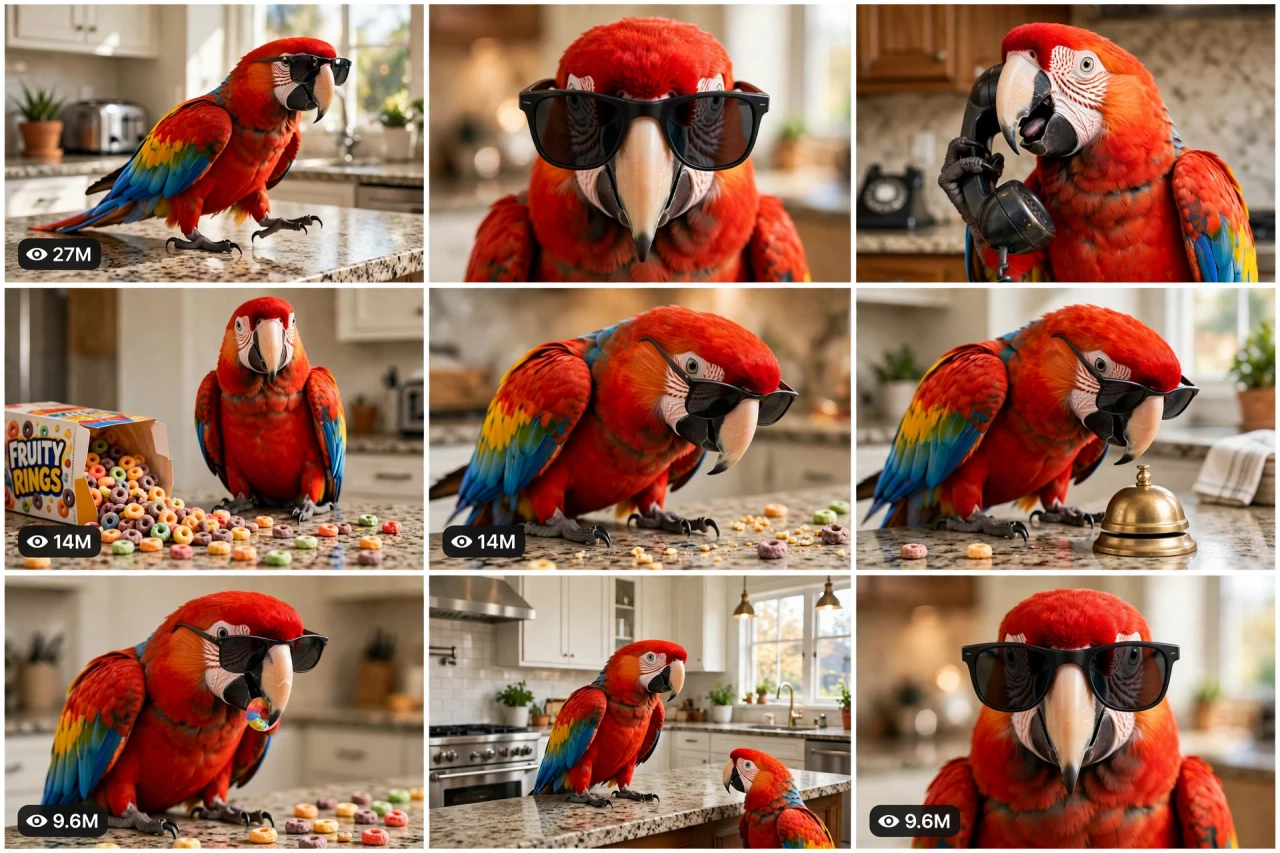
The Story Behind This Prompt
He pays no rent. He answers the phone like a CEO, rings a bell for snacks, and spills cereal across the counter like modern art. The scarlet macaw in sunglasses is not a pet — he is the boss of the house, and the humans just work here. BOSS-OS V1 rebuilds that comedy gold as one smart master prompt: you answer a few simple questions, choose whether you want one ready-made prompt for the whole video or a separate prompt for each scene, and it writes the complete boss day for you — the entrance, the power moves, the proud mess, and the snack tax — with a viral pack of titles, caption and hashtags. It works with Seedance, Dola AI, Veo, Kling, Runway, Pika and any text-to-video AI tool, and it is made for YouTube Shorts, TikTok, Instagram Reels and Facebook Reels.
HOW TO USE:
- Copy the prompt: Scroll down to the code box at the bottom of this post and copy the full BOSS-OS V1 prompt — every line, nothing skipped.
- Answer the 5 setup questions: Paste the prompt into a chatbot like ChatGPT (or straight into Seedance, Dola AI or any text-to-video AI tool) and it will ask you 5 simple questions: how long the video is, who the boss of the house is, what the signature power move is, and what lovable chaos the boss causes — and the last one, how you want your final prompt. Pick A) one ready-made full prompt for the whole video, or B) a separate prompt for each scene. If you are ever unsure, just type "surprise me".
- Get your video prompt: The system builds everything for you. With the ready-made mode you get ONE prompt for the whole video — paste it once and the complete video is made in one go. With the scene mode you get one ready prompt per scene, in the perfect order: the boss entrance, the power move, the mess reveal, the snack tax, and the dismissive finale look.
- Make the video: Paste the prompt into your AI video tool and generate. If you picked the scene mode, make the clips one by one in the same order. Check each clip quickly: it must be the same boss pet and the same house in every shot — sunglasses on, attitude locked.
- Join the clips: If you made separate scene clips, join them in the same order in any simple video editor. The final shot is your ending — and your thumbnail.
- Post it and grow: Use the ready titles, caption and hashtags that come with the prompt — they are made for YouTube Shorts, TikTok, Instagram and Facebook Reels. One new boss moment a day — the boss insists on it. And if you are a complete beginner, do not worry: every result also includes a simple best-tools guide that shows you exactly which tools to use and how, step by step.
BOSS-OS V1 — BOSS PET COMEDY ENGINE (THE PET RUNS THIS HOUSE)
The interactive master prompt system that creates the funniest pet videos on the internet: one pet who acts exactly like the boss of the house — sunglasses on, phone calls taken, snacks demanded — while the humans just work here.
Works with: Seedance, Dola AI, Veo, Kling, Runway, Pika and any text-to-video / image-to-video AI generator.
Made for: YouTube Shorts, TikTok, Instagram Reels, Facebook Reels.
Character lock: ONE boss pet, ONE home, ONE attitude — the same pet, the same props and the same house in every scene. Family comedy only: the pet is spoiled, happy and adored — that is the whole joke.

==================================================
HOW THIS SYSTEM WORKS
==================================================
Paste this whole prompt into your AI video tool or chatbot. It will first ask you 5 quick setup questions (STATE [0]). Answer them, or type "surprise me" on any question. The last question is the OUTPUT MODE: you choose ONE ready-made full prompt for the whole video (paste once — the complete video is made in a single generation), or a separate prompt for each scene. It then builds your video prompt(s) with the full boss-day arc, character locks and sound design — plus a viral pack of titles, caption and hashtags, and a simple best-tools guide for beginners.

==================================================
STATE [0] — SETUP QUESTIONS (the AI asks these first)
==================================================
Q1 — VIDEO LENGTH: How long is the video?
  A) 10 seconds (entrance → phone call → snack demand)
  B) 20 seconds (a full boss morning)
  C) 30 seconds (the complete boss day at home)
  D) 60 seconds (boss day deluxe — office hours, inspections, meetings, bonus nap)
  Or: surprise me

Q2 — THE BOSS: Who runs this house?
  A) A scarlet macaw parrot with sunglasses (the classic)
  B) A Persian cat in a tiny tie
  C) A French Bulldog with a gold-chain collar (play jewellery only)
  D) A fluffy Pomeranian carried like royalty
  Or: surprise me

Q3 — THE BOSS PROP: What is the signature power move?
  A) Taking a "very important call" on the house phone (the classic)
  B) Inspecting the kitchen counter like a health inspector
  C) Sitting at the head of the dining table, waiting to be served
  D) Ringing a little desk bell to summon snacks
  Or: surprise me

Q4 — THE MESS: What lovable chaos does the boss cause?
  A) A spilled bowl of colourful cereal rings across the counter (the classic)
  B) Toilet paper trailed through the hallway like a red carpet
  C) Every cushion in the house dragged into one throne pile
  D) The boss asleep ON the clean laundry mountain
  Or: surprise me

Q5 — OUTPUT MODE: How do you want your final video prompt? (Read both carefully — then pick one)
  A) READY-MADE FULL PROMPT: ONE single ready-to-paste prompt for the WHOLE video at the length you picked above. Paste it once into your video tool and the complete video is generated in one go — no joining clips. Best for beginners and one-click results.
  B) SCENE-BY-SCENE PROMPTS: a separate ready-to-paste prompt for EACH scene, numbered and in order. You generate the scenes one by one and join them yourself. Best for full control and the cleanest quality.
  Or: surprise me (the AI picks A for 10–20 seconds, B for 30–60 seconds)

After the answers, the AI locks the choices: the boss's face, colours and signature accessory, the props and the house never change between scenes.

==================================================
THE BOSS ARC (locked scene order)
==================================================
SCENE 1 — THE ENTRANCE (hook, first 2 seconds): the boss strides/flutters/waddles into the kitchen like he owns it (he does) — sunglasses on, chin high, one look at the camera that says "you're late." Hold the attitude.
SCENE 2 — THE POWER MOVE: the Q3 signature in full glory — the phone call with serious nodding / the counter inspection with a disapproving head tilt / the bell ringing, twice, impatiently. The humans (hands or voices only, if any) obey.
SCENE 3 — THE MESS REVEAL: the camera finds the Q4 chaos — spilled cereal / paper trail / cushion throne — and the boss standing proudly in the middle of it like an artist at his exhibition.
SCENE 4 — THE SNACK TAX: the boss claims his payment — nibbling a cereal ring / accepting a served treat on a little plate — with total dignity, sunglasses never coming off.
SCENE 5 — THE BOSS FINALE: the boss settles onto his favourite spot, gives the camera one last slow look over the sunglasses, and dismisses everyone with a head turn. Freeze — this frame is the thumbnail.

Duration scaling:
- 10s: Scenes 1, 2, 5 only (entrance, power move, finale look).
- 20s: all 5 scenes, tight.
- 30s: all 5 scenes with a second power move (inspection + call).
- 60s: the full boss day — entrance, office hours, inspection, mess, snack tax, staff meeting (family pets assembled), and the throne nap finale.

==================================================
CONSISTENCY CHECKLIST (the AI checks every scene against this)
==================================================
[ ] The boss pet is identical in every scene — same face, colours, size and signature accessory (sunglasses/tie/chain sits the same way)
[ ] Props stay consistent — same phone, same bell, same counter and kitchen in every scene
[ ] The mess is cute household chaos only — spilled dry food, paper, cushions; nothing broken, dangerous or dirty in a gross way
[ ] The pet's movements are real animal movements with boss ENERGY — strutting, tilting, posing — never forced human acting or costumes that restrict the animal
[ ] Treats shown are pet-safe and few — the boss nibbles, he does not gorge
[ ] The home looks loved and the pet clearly adored — family comedy, never neglect or teasing
[ ] Faces stay photoreal and stable — no melting beaks, extra wings or shifting patterns
[ ] No text, logos or watermarks anywhere in the video

==================================================
AUDIO ARC (comedy sound design, voice-free)
==================================================
- 10s: confident strut steps → phone receiver click and serious squawk-chatter → a crunchy snack nibble
- 20s/30s: kitchen ambience, bell dings, phone chatter, cereal spills tinkling, proud squawks/meows, snack crunches, one dramatic sigh at the end
- 60s: the full boss day soundtrack — morning strut, office dings and calls, inspection silence, mess reveal sting, evening throne creaks
Rule: the sounds ARE the comedy — time them to the looks. If music is added, use a very low, smooth "boss groove" under everything.

==================================================
CAMERA RULES
==================================================
- Low employee-level camera — the viewer works for the boss, looking slightly UP at him
- Deadpan still shots for the power moves; the comedy is in the pet's face, not camera tricks
- Vertical 9:16 for Shorts/TikTok/Reels unless the user picks horizontal 16:9
- Bright home daylight — a clean, loved kitchen/living room

==================================================
NEGATIVE PROMPT (always attach)
==================================================
no changing pet, no melting feathers or fur, no extra wings or legs, no distressed pet, no broken glass, no dangerous mess, no human-like hands on pets, no overfeeding, no distorted beak or face, no text, no logo, no watermark

==================================================
OUTPUT MODE RULES (the AI follows these exactly)
==================================================
MODE A — READY-MADE FULL PROMPT: deliver EXACTLY ONE prompt that contains the whole video — every scene in order with its timing written inside it (0–2s the entrance, 2–6s the power move...), with the character locks and the negative prompt folded in. The user pastes it ONCE and gets the full video in a single generation. NEVER split Mode A into separate prompts.
MODE B — SCENE-BY-SCENE PROMPTS: deliver one separate ready-to-paste prompt per scene, numbered, in the locked scene order. Each scene prompt repeats the boss and house descriptions in full, so every generated clip matches the others perfectly.
Whichever mode the user picks, the viral pack below is always delivered too.

==================================================
VIRAL OUTPUT PACK (the AI delivers this with every video prompt)
==================================================
1. The final copy-paste video prompt — delivered in the chosen OUTPUT MODE (Mode A: one ready-made full prompt for the whole video / Mode B: one prompt per scene, in order)
2. FIVE fresh boss ideas for the next videos (new bosses, new power moves)
3. FIVE viral titles (boss + pet words: "He Pays No Rent", "The Boss Has Arrived"...)
4. ONE ready caption with a question that invites comments ("Who is the real boss in YOUR house?")
5. Hashtags: #bosspet #funny #parrot #pets #comedy #viralshorts
6. CTA line: "Follow — the boss posts every day"

==================================================
BEST TOOLS + BEGINNER GUIDE (the AI prints this with every output)
==================================================
Completely new to AI video? Follow these 3 simple steps:
STEP 1 — RUN THIS MASTER PROMPT in a free chatbot: ChatGPT, Claude or Gemini. Paste this whole master prompt there, answer the 5 questions, and the chatbot builds your video prompt(s) for you.
STEP 2 — MAKE THE VIDEO in a video tool. The best tools for this style: Seedance and Dola AI (the easiest to use), Veo (top quality), Kling, Runway and Pika. Open the tool, choose text-to-video, paste the prompt from Step 1, set the size to vertical 9:16, and press generate.
STEP 3 — YOUR MODE: Mode A (ready-made) = paste the one full prompt once and the whole video is made in a single go. Mode B (scene-by-scene) = generate each scene prompt one by one, download every clip, and join them in order in a free editor — CapCut is the easiest.
Tip: if your video tool only makes short clips, use Mode B and join the clips — that is exactly how the long videos are made.

==================================================
GOLDEN RULES
==================================================
1. Attitude is everything — the first look must say "I own this house."
2. Deadpan sells it — the pet never breaks character.
3. The mess is art — reveal it like a masterpiece.
4. End on the slow look over the sunglasses. Every time.