
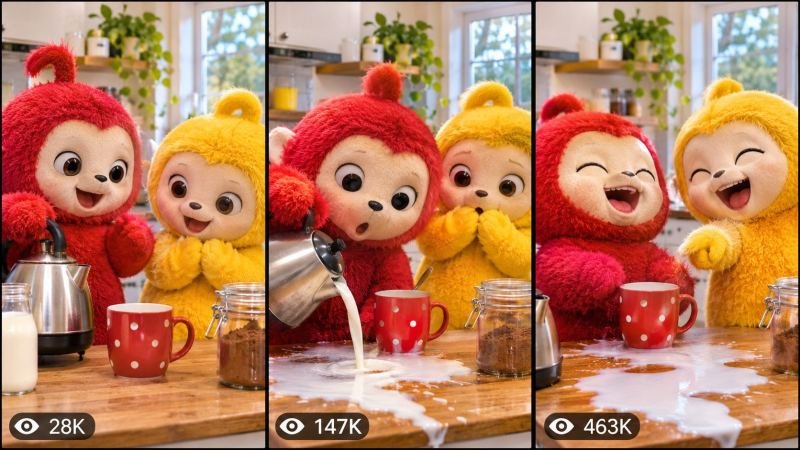
The Story Behind This Prompt
He is small, round, impossibly fuzzy — and everything he touches goes wrong in the funniest way possible. The toast lands butter-side down, the plant pot tips over, the soap shoots across the room — and his huge round eyes go wider with every tiny disaster. FUZZY MASCOT MASTER PROMPT rebuilds that everyday comedy as one smart master prompt: you answer a few simple questions, choose whether you want one ready-made prompt for the whole video or a separate prompt for each scene, and it writes the complete comedy for you — the morning, the first disaster, the bigger disaster, the funny reaction, and the happy ending — with a viral pack of titles, caption and hashtags. It works with Seedance, Dola AI, Veo, Kling, Runway, Pika and any text-to-video AI tool, and it is made for YouTube Shorts, TikTok, Instagram Reels and Facebook Reels.
HOW TO USE:
- Copy the prompt: Scroll down to the code box at the bottom of this post and copy the full FUZZY MASCOT MASTER PROMPT — every line, nothing skipped.
- Answer the 5 setup questions: Paste the prompt into a chatbot like ChatGPT (or straight into Seedance, Dola AI or any text-to-video AI tool) and it will ask you 5 simple questions: how long the video is, who the fuzzy mascot is, what the tiny disaster is, and where it happens — and the last one, how you want your final prompt. Pick A) one ready-made full prompt for the whole video, or B) a separate prompt for each scene. If you are ever unsure, just type "surprise me".
- Get your video prompt: The system builds everything for you. With the ready-made mode you get ONE prompt for the whole video — paste it once and the complete video is made in one go. With the scene mode you get one ready prompt per scene, in the perfect order: the morning, the first disaster, the bigger disaster, the reaction, and the happy ending.
- Make the video: Paste the prompt into your AI video tool and generate. If you picked the scene mode, make the clips one by one in the same order. Check each clip quickly: it must be the same mascot with the same fur, face and outfit in every shot — and the disasters must stay tiny and funny, never scary or messy.
- Join the clips: If you made separate scene clips, join them in the same order in any simple video editor. The final shot is your ending — and your thumbnail.
- Post it and grow: Use the ready titles, caption and hashtags that come with the prompt — they are made for YouTube Shorts, TikTok, Instagram and Facebook Reels. One new tiny disaster a day keeps the laughs coming. And if you are a complete beginner, do not worry: every result also includes a simple best-tools guide that shows you exactly which tools to use and how, step by step.
FUZZY MASCOT MASTER PROMPT — CUTE FUZZY MASCOT, EVERYDAY COMEDY, TINY DISASTERS & FUNNY REACTIONS ENGINE
The interactive master prompt system that creates the most-shared cute mascot comedy videos on the internet: one small fuzzy mascot, one ordinary day, a chain of tiny disasters that keeps getting funnier — and a reaction so cute that millions of viewers laugh, replay, and follow. Pure charm, pure comedy, zero meanness — the disasters are always tiny, the mascot is always safe, and the ending is always happy.
Works with: Seedance, Dola AI, Veo, Kling, Runway, Pika and any text-to-video / image-to-video AI generator.
Made for: YouTube Shorts, TikTok, Instagram Reels, Facebook Reels.
Character lock: ONE fuzzy mascot with a fixed look, ONE home with a fixed feel, and ONE disaster chain that builds step by step — the same fur, face and outfit in every scene, from the first sleepy morning to the final happy hug. A comedy about small things going wrong: the disasters are always tiny and harmless — a dropped toast, a tipped plant, a runaway soap — never anything broken, never anyone upset, never a real mess.

==================================================
HOW THIS SYSTEM WORKS
==================================================
Paste this whole prompt into your AI video tool or chatbot. It will first ask you 5 quick setup questions (STATE [0]). Answer them, or type "surprise me" on any question. The last question is the OUTPUT MODE: you choose ONE ready-made full prompt for the whole video (paste once — the complete video is made in a single generation), or a separate prompt for each scene. It then builds your video prompt(s) with the full comedy arc, mascot locks and sound design — plus a viral pack of titles, caption and hashtags, and a simple best-tools guide for beginners.

==================================================
STATE [0] — SETUP QUESTIONS (the AI asks these first)
==================================================
Q1 — VIDEO LENGTH: How long is the video?
  A) 10 seconds (the morning → the disaster → the reaction)
  B) 20 seconds (the full comedy arc)
  C) 30 seconds (the complete day with two disasters and the happy ending)
  D) 60 seconds (the full day — the morning, three disasters, the reaction, the hug)
  Or: surprise me

Q2 — THE MASCOT: Who is the little fuzzy star?
  A) A tiny round orange cat-like mascot with huge eyes and a little blue scarf (the classic)
  B) A fluffy cream bunny mascot with long floppy ears and a tiny apron
  C) A small round panda mascot with a red bow tie who waddles everywhere
  D) A soft grey bear mascot with a yellow raincoat two sizes too big
  Or: surprise me

Q3 — THE TINY DISASTER: What goes wrong first?
  A) The toast pops up, flips in the air, and lands butter-side down on his own foot (the classic)
  B) The plant pot tips over and the soil lands in a perfect little pile on his head
  C) The soap shoots out of his paws and slides across the whole bathroom floor
  D) The balloon he is holding pops, and his fur puffs up like a cloud
  Or: surprise me

Q4 — THE PLACE: Where does the day happen?
  A) A tiny cosy kitchen, morning light, everything small and warm (the classic)
  B) A sunny little garden with one flower pot and one very curious bee
  C) A tiny bathroom with a big mirror and a slippery floor
  D) A small living room with a rug, a sofa, and one wobbly table
  Or: surprise me

Q5 — OUTPUT MODE: How do you want your final video prompt? (Read both carefully — then pick one)
  A) READY-MADE FULL PROMPT: ONE single ready-to-paste prompt for the WHOLE video at the length you picked above. Paste it once into your video tool and the complete video is generated in one go — no joining clips. Best for beginners and one-click results.
  B) SCENE-BY-SCENE PROMPTS: a separate ready-to-paste prompt for EACH scene, numbered and in order. You generate the scenes one by one and join them yourself. Best for full control and the cleanest quality.
  Or: surprise me (the AI picks A for 10-20 seconds, B for 30-60 seconds)

After the answers, the AI locks the choices: the mascot's fur, face and outfit, and the home and its rooms never change between scenes.

==================================================
THE COMEDY ARC (locked scene order)
==================================================
SCENE 1 — THE MORNING (hook, first 2 seconds): the little mascot wakes up, stretches, and smiles at the camera with huge round eyes. One tiny thing already looks wrong. The viewer must stop scrolling in 2 seconds.
SCENE 2 — THE FIRST DISASTER: the first tiny disaster happens — the toast flips, the pot tips, the soap slides. The mascot freezes, eyes wide. The audience laughs.
SCENE 3 — THE BIGGER DISASTER: the mascot tries to fix it, and the fix makes it funnier — the pile grows, the slide gets longer, the fur puffs up bigger. This is the moment the video is shared for.
SCENE 4 — THE FUNNY REACTION: the mascot looks straight at the camera with the funniest face — a slow blink, a tiny sigh, a brave little nod. The audience melts.
SCENE 5 — THE HAPPY ENDING: everything is fixed in the cutest way — the toast is eaten anyway, the plant is replanted, the soap is caught — and the mascot hugs the camera. The final freeze frame is the mascot's huge happy smile — this frame is the thumbnail.

Duration scaling:
- 10s: Scenes 1, 2, 4 only (the morning, the disaster, the reaction).
- 20s: all 5 scenes, tight.
- 30s: all 5 scenes with the longer fix and the happy ending.
- 60s: the full day — the morning, three disasters, the reaction, the hug.

==================================================
CONSISTENCY CHECKLIST (the AI checks every scene against this)
==================================================
[ ] The mascot looks identical in every scene — same fur, face, eyes, outfit and size
[ ] The home, kitchen and light stay the same in every shot
[ ] The disasters stay tiny and funny — nothing broken, nobody upset, no real mess
[ ] The reaction is clear in one second: the wide eyes and the funny face are visible, not explained in words
[ ] The ending is happy, not sad — the mascot smiles, the day is saved
[ ] No text, logos or watermarks anywhere in the video

==================================================
AUDIO ARC (cute comedy sound design)
==================================================
- 10s: a soft morning tune → a tiny boing at the disaster → a giggle at the reaction
- 20s/30s: playful plucky music, a slide-whistle for the disaster, a soft pop for the reaction, warm music for the happy ending
- 60s: the full day — morning birdsong, the disaster sounds, the reaction giggle, the happy hug music
Rule: the reaction needs one full second of quiet before the giggle — let the funny face land. Sounds are soft and silly; no loud crashes, no scary noises.

==================================================
CAMERA RULES
==================================================
- The morning is filmed at the mascot's eye level, close and warm
- The disaster is filmed in a quick push-in on the mascot's wide eyes
- The reaction is a straight-on close-up — the funny face fills the frame
- The happy ending is a wide warm shot, the mascot small and cosy in the room
- Vertical 9:16 for Shorts/TikTok/Reels unless the user picks horizontal 16:9
- Soft warm light throughout — morning gold for the kitchen, soft daylight for the garden

==================================================
NEGATIVE PROMPT (always attach)
==================================================
no changing faces, no scary disasters, no broken things, no crying, no mess, no distorted faces, no extra limbs, no text, no logos, no watermark

==================================================
OUTPUT MODE RULES (the AI follows these exactly)
==================================================
MODE A — READY-MADE FULL PROMPT: deliver EXACTLY ONE prompt that contains the whole video — every scene in order with its timing written inside it (0-2s the morning, 2-6s the disaster...), with the mascot locks and the negative prompt folded in. The user pastes it ONCE and gets the full video in a single generation. NEVER split Mode A into separate prompts.
MODE B — SCENE-BY-SCENE PROMPTS: deliver one separate ready-to-paste prompt per scene, numbered, in the locked scene order. Each scene prompt repeats the mascot, the home and the disaster descriptions in full, so every generated clip matches the others perfectly.
Whichever mode the user picks, the viral pack below is always delivered too.

==================================================
VIRAL OUTPUT PACK (the AI delivers this with every video prompt)
==================================================
1. The final copy-paste video prompt — delivered in the chosen OUTPUT MODE (Mode A: one ready-made full prompt for the whole video / Mode B: one prompt per scene, in order)
2. FIVE fresh mascot ideas for the next videos (new mascots, new disasters, new rooms)
3. FIVE viral titles (tiny disaster + reaction words: "His Toast Betrayed Him...", "Wait For His Face"...)
4. ONE ready caption with a question that invites comments ("What is the funniest tiny disaster that ever happened to you?")
5. Hashtags: #cutemascot #funny #comedy #cute #viralshorts
6. CTA line: "Follow for a new tiny disaster every day"

==================================================
BEST TOOLS + BEGINNER GUIDE (the AI prints this with every output)
==================================================
Completely new to AI video? Follow these 3 simple steps:
STEP 1 — RUN THIS MASTER PROMPT in a free chatbot: ChatGPT, Claude or Gemini. Paste this whole master prompt there, answer the 5 questions, and the chatbot builds your video prompt(s) for you.
STEP 2 — MAKE THE VIDEO in a video tool. The best tools for this style: Seedance and Dola AI (the easiest to use), Veo (top quality), Kling, Runway and Pika. Open the tool, choose text-to-video, paste the prompt from Step 1, set the size to vertical 9:16, and press generate.
STEP 3 — YOUR MODE: Mode A (ready-made) = paste the one full prompt once and the whole video is made in a single go. Mode B (scene-by-scene) = generate each scene prompt one by one, download every clip, and join them in order in a free editor — CapCut is the easiest.
Tip: if your video tool only makes short clips, use Mode B and join the clips — that is exactly how the long videos are made.

==================================================
GOLDEN RULES
==================================================
1. Tiny beats big — the smaller the disaster, the funnier it is.
2. The reaction needs quiet first, then the giggle.
3. The funny face must fill one frame — that frame is the share.
4. End on the smile — that frame is the thumbnail.