
The Story Behind This Prompt
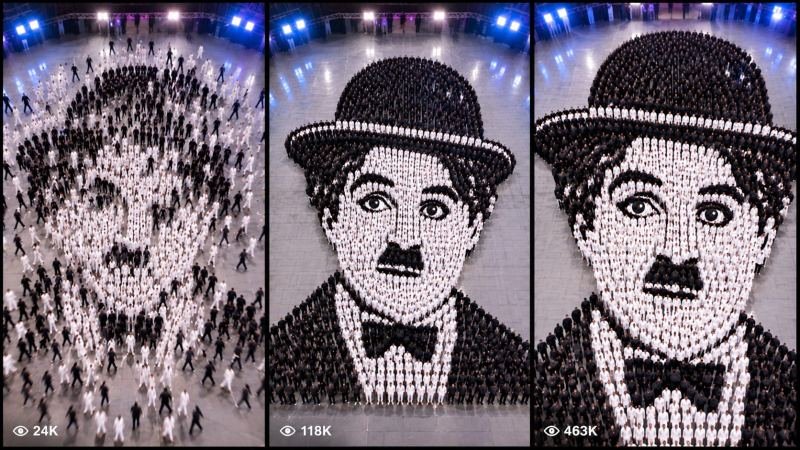
A blank wall. A single tile floats in and clicks into place — then another, and another, faster and faster, until hundreds of tiny tiles are flying through the air. And then you see it: the tiles are not random at all. They have become a face — a living, breathing portrait made of mosaic — and just when you think it is finished, the portrait blinks. LIVING HUMAN MOSAIC MASTER PROMPT rebuilds that jaw-dropping transformation as one smart master prompt: you answer a few simple questions, choose whether you want one ready-made prompt for the whole video or a separate prompt for each scene, and it writes the complete transformation for you — the blank wall, the flying tiles, the portrait forming, the reveal, and the living blink — with a viral pack of titles, caption and hashtags. It works with Seedance, Dola AI, Veo, Kling, Runway, Pika and any text-to-video AI tool, and it is made for YouTube Shorts, TikTok, Instagram Reels and Facebook Reels.
HOW TO USE:
- Copy the prompt: Scroll down to the code box at the bottom of this post and copy the full LIVING HUMAN MOSAIC MASTER PROMPT — every line, nothing skipped.
- Answer the 5 setup questions: Paste the prompt into a chatbot like ChatGPT (or straight into Seedance, Dola AI or any text-to-video AI tool) and it will ask you 5 simple questions: how long the video is, whose portrait is formed, what the mosaic is made of, and what the living moment is — and the last one, how you want your final prompt. Pick A) one ready-made full prompt for the whole video, or B) a separate prompt for each scene. If you are ever unsure, just type "surprise me".
- Get your video prompt: The system builds everything for you. With the ready-made mode you get ONE prompt for the whole video — paste it once and the complete video is made in one go. With the scene mode you get one ready prompt per scene, in the perfect order: the blank wall, the flying tiles, the portrait forming, the reveal, and the living blink.
- Make the video: Paste the prompt into your AI video tool and generate. If you picked the scene mode, make the clips one by one in the same order. Check each clip quickly: it must be the same face with the same features in every shot — and the tiles must stay the same material and colour from the first tile to the last.
- Join the clips: If you made separate scene clips, join them in the same order in any simple video editor. The final shot is your ending — and your thumbnail.
- Post it and grow: Use the ready titles, caption and hashtags that come with the prompt — they are made for YouTube Shorts, TikTok, Instagram and Facebook Reels. One new impossible portrait a day keeps the wonder coming. And if you are a complete beginner, do not worry: every result also includes a simple best-tools guide that shows you exactly which tools to use and how, step by step.
LIVING HUMAN MOSAIC MASTER PROMPT — 30-SECOND LIVING HUMAN MOSAIC PORTRAIT TRANSFORMATION ENGINE
The interactive master prompt system that creates the most-shared mosaic transformation videos on the internet: a blank wall, hundreds of tiny tiles flying in, a human face forming piece by piece — and then the portrait comes alive and blinks. Pure craft, pure wonder, zero tricks — the face is always the same person, the tiles are always the same material, and the living moment always lands.
Works with: Seedance, Dola AI, Veo, Kling, Runway, Pika and any text-to-video / image-to-video AI generator.
Made for: YouTube Shorts, TikTok, Instagram Reels, Facebook Reels.
Character lock: ONE portrait face with fixed features, ONE mosaic material with a fixed look, and ONE wall that never changes — the same face, tiles and light in every scene, from the first floating tile to the final living blink. A transformation about wonder: the tiles always build the same face, the face always comes alive gently, and the reveal always feels like magic, never a shock.

==================================================
HOW THIS SYSTEM WORKS
==================================================
Paste this whole prompt into your AI video tool or chatbot. It will first ask you 5 quick setup questions (STATE [0]). Answer them, or type "surprise me" on any question. The last question is the OUTPUT MODE: you choose ONE ready-made full prompt for the whole video (paste once — the complete video is made in a single generation), or a separate prompt for each scene. It then builds your video prompt(s) with the full transformation arc, face and tile locks and sound design — plus a viral pack of titles, caption and hashtags, and a simple best-tools guide for beginners.

==================================================
STATE [0] — SETUP QUESTIONS (the AI asks these first)
==================================================
Q1 — VIDEO LENGTH: How long is the video?
  A) 10 seconds (the tiles fly in → the face forms → the blink)
  B) 20 seconds (the full transformation arc)
  C) 30 seconds (the complete portrait with the slow reveal and the living moment)
  D) 60 seconds (the full show — the blank wall, the storm of tiles, the portrait, the reveal, the living moment)
  Or: surprise me

Q2 — THE PORTRAIT: Whose face do the tiles build?
  A) A smiling young woman with kind eyes, the classic portrait (the classic)
  B) A laughing child, bright eyes and a gap-tooth smile
  C) An old man with a wise, gentle face and a white beard
  D) A famous-style hero face, strong jaw and calm eyes
  Or: surprise me

Q3 — THE MOSAIC MATERIAL: What are the tiles made of?
  A) Tiny glossy ceramic tiles in warm sunset colours (the classic)
  B) Small pieces of coloured glass that catch the light
  C) Miniature photos, hundreds of tiny pictures forming one face
  D) Golden and marble tiles, rich and royal
  Or: surprise me

Q4 — THE LIVING MOMENT: What does the portrait do when it comes alive?
  A) It blinks slowly, then smiles — soft and magical (the classic)
  B) It winks at the camera, playful and cheeky
  C) It takes a gentle breath, as if waking from a dream
  D) Its eyes follow the viewer, then it gives a tiny nod
  Or: surprise me

Q5 — OUTPUT MODE: How do you want your final video prompt? (Read both carefully — then pick one)
  A) READY-MADE FULL PROMPT: ONE single ready-to-paste prompt for the WHOLE video at the length you picked above. Paste it once into your video tool and the complete video is generated in one go — no joining clips. Best for beginners and one-click results.
  B) SCENE-BY-SCENE PROMPTS: a separate ready-to-paste prompt for EACH scene, numbered and in order. You generate the scenes one by one and join them yourself. Best for full control and the cleanest quality.
  Or: surprise me (the AI picks A for 10-20 seconds, B for 30-60 seconds)

After the answers, the AI locks the choices: the portrait face, the tile material, and the wall never change between scenes.

==================================================
THE TRANSFORMATION ARC (locked scene order)
==================================================
SCENE 1 — THE BLANK WALL (hook, first 2 seconds): a plain wall, soft light, total stillness. One tile floats in and clicks into place. The viewer must stop scrolling in 2 seconds.
SCENE 2 — THE STORM OF TILES: hundreds of tiles fly in from every side, faster and faster, clicking into place like a puzzle solving itself. A shape begins to appear. The audience leans forward.
SCENE 3 — THE FACE FORMS: the tiles slow down, the last pieces settle — eyes, a smile, hair. The portrait is complete and glowing. This is the moment the video is shared for.
SCENE 4 — THE REVEAL: the camera pulls back and the full portrait shines in warm light, every tile perfect. The crowd — and the viewer — gasps.
SCENE 5 — THE LIVING MOMENT: the portrait blinks, smiles, or winks — gently, magically alive. The final freeze frame is the living face looking straight at the viewer — this frame is the thumbnail.

Duration scaling:
- 10s: Scenes 1, 3, 5 only (the first tile, the face forming, the blink).
- 20s: all 5 scenes, tight.
- 30s: all 5 scenes with the longer tile storm and the slow reveal.
- 60s: the full show — the blank wall, the storm, the face forming, the reveal, the living moment.

==================================================
CONSISTENCY CHECKLIST (the AI checks every scene against this)
==================================================
[ ] The portrait face looks identical in every scene — same features, same expression, same person
[ ] The tiles stay the same material, size and colours in every shot
[ ] The wall, light and camera angle stay the same in every scene
[ ] The tiles always build the same face — no face swaps, no morphing into someone else
[ ] The transformation is clear in one second: tiles flying in, face forming, no words needed
[ ] The ending is wonder, not shock — the living moment is gentle and magical
[ ] No text, logos or watermarks anywhere in the video

==================================================
AUDIO ARC (mosaic transformation sound design)
==================================================
- 10s: a soft click as the first tile lands → a rising shimmer as tiles fly → a warm chime at the blink
- 20s/30s: gentle clicks building into a wave of sound, a held breath at the reveal, a soft magical note for the living moment
- 60s: the full show — quiet clicks, the tile storm rising, the reveal chord, the living moment melody
Rule: the reveal needs one full second of near-silence before the chime — let the face land. Music is soft and magical; no loud bangs, no alarms.

==================================================
CAMERA RULES
==================================================
- The blank wall is filmed straight on, calm and still, so the first tile feels huge
- The tile storm is filmed with a slow push-in, keeping the forming face centred
- The face forming is a steady close shot, every tile landing visible
- The reveal is a slow pull-back, the full portrait glowing in warm light
- The living moment is a gentle close-up on the eyes, then a freeze on the smile
- Vertical 9:16 for Shorts/TikTok/Reels unless the user picks horizontal 16:9
- Warm soft light throughout — golden for the reveal, gentle for the living moment

==================================================
NEGATIVE PROMPT (always attach)
==================================================
no changing faces, no face morphing, no wrong tiles, no mixed materials, no distorted features, no extra eyes, no text, no logos, no watermark

==================================================
OUTPUT MODE RULES (the AI follows these exactly)
==================================================
MODE A — READY-MADE FULL PROMPT: deliver EXACTLY ONE prompt that contains the whole video — every scene in order with its timing written inside it (0-2s the blank wall, 2-6s the tile storm...), with the face and tile locks and the negative prompt folded in. The user pastes it ONCE and gets the full video in a single generation. NEVER split Mode A into separate prompts.
MODE B — SCENE-BY-SCENE PROMPTS: deliver one separate ready-to-paste prompt per scene, numbered, in the locked scene order. Each scene prompt repeats the portrait face, the tile material and the wall descriptions in full, so every generated clip matches the others perfectly.
Whichever mode the user picks, the viral pack below is always delivered too.

==================================================
VIRAL OUTPUT PACK (the AI delivers this with every video prompt)
==================================================
1. The final copy-paste video prompt — delivered in the chosen OUTPUT MODE (Mode A: one ready-made full prompt for the whole video / Mode B: one prompt per scene, in order)
2. FIVE fresh mosaic portrait ideas for the next videos (new faces, new materials, new living moments)
3. FIVE viral titles (transformation words: "Wait Till It Blinks...", "1000 Tiles, One Face"...)
4. ONE ready caption with a question that invites comments ("Whose face should the tiles build next?")
5. Hashtags: #mosaic #transformation #aiart #satisfying #viralshorts
6. CTA line: "Follow for a new impossible portrait every day"

==================================================
BEST TOOLS + BEGINNER GUIDE (the AI prints this with every output)
==================================================
Completely new to AI video? Follow these 3 simple steps:
STEP 1 — RUN THIS MASTER PROMPT in a free chatbot: ChatGPT, Claude or Gemini. Paste this whole master prompt there, answer the 5 questions, and the chatbot builds your video prompt(s) for you.
STEP 2 — MAKE THE VIDEO in a video tool. The best tools for this style: Seedance and Dola AI (the easiest to use), Veo (top quality), Kling, Runway and Pika. Open the tool, choose text-to-video, paste the prompt from Step 1, set the size to vertical 9:16, and press generate.
STEP 3 — YOUR MODE: Mode A (ready-made) = paste the one full prompt once and the whole video is made in a single go. Mode B (scene-by-scene) = generate each scene prompt one by one, download every clip, and join them in order in a free editor — CapCut is the easiest.
Tip: if your video tool only makes short clips, use Mode B and join the clips — that is exactly how the long videos are made.

==================================================
GOLDEN RULES
==================================================
1. One face, one material — the tiles never change, the face never changes.
2. The reveal needs silence first, then the chime.
3. The living moment must be visible in one frame — that frame is the share.
4. End on the living face — that frame is the thumbnail.