
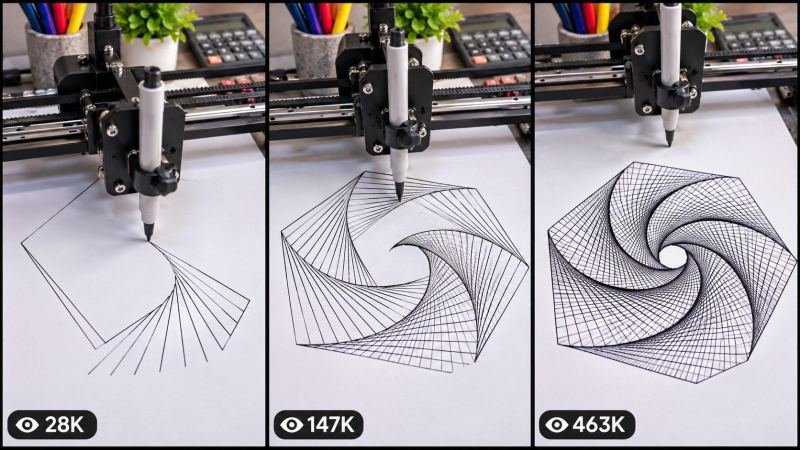
There is a reason pen plotter videos are so hard to stop watching. A quiet robot arm, a steady pen, and a blank page slowly turn into a perfect spiral, a face, or a whole city. No talking. No rush. Just clean lines appearing one by one, until the final picture makes you say wow. This robotic pen plotter satisfying drawing master prompt gives you that exact effect, every time, without needing a real robot.
This prompt works with the tools people actually use today, including Seedance, Dola AI, Veo, Kling, Runway and Pika. It is made for short vertical videos on YouTube Shorts, TikTok and Instagram and Facebook Reels, where satisfying, loop-friendly clips get watched again and again. You control the drawing, the pen, the paper and the pace, so every video feels calm, precise and finished.
HOW TO USE
Step 1 - Copy the master prompt: Scroll down to the code box at the bottom of this post and copy the full master prompt.
Step 2 - Paste it into a chatbot: Paste it into ChatGPT or a similar chatbot first. The chatbot will ask you 5 simple setup questions.
Step 3 - Answer the 5 questions: Answer in very simple words. If you do not know an answer, just write surprise me and the system will choose a good idea for you.
Step 4 - Choose your mode: In question 5, pick Mode A for one ready-made prompt for the whole video, or Mode B for one prompt for each scene.
Step 5 - Make the video: Paste the finished prompt into Seedance, Dola AI, Veo, Kling, Runway or Pika and generate your video.
Step 6 - Post it: Use the title, caption and hashtags that come with the prompt, and post it on YouTube Shorts, TikTok or Reels.
THE 5 SETUP QUESTIONS
Question 1 - What is being drawn? Choose a spiral pattern, a portrait, an animal, a building, or a mandala. Or write surprise me.
Question 2 - What pen and paper? Choose a fine black pen on white paper, a coloured pen set, or a bold marker on cream paper. Or write surprise me.
Question 3 - How does it start and end? Pick a blank page start, a close-up of the pen tip, or a slow reveal of the finished drawing. Or write surprise me.
Question 4 - How long is the video? Choose 15 seconds, 30 seconds or 60 seconds, and say if you want soft machine sounds and a calm finish. Or write surprise me.
Question 5 - Which mode do you want? Mode A gives you one ready-made prompt for the whole video. Mode B gives you a separate prompt for each scene, so you can generate the scenes one by one and join them together. For either mode, you can also write surprise me and let the system pick the drawing for you.
WHY THE PLOTTER EFFECT WORKS
Viewers love to see a picture build itself. The brain wants to know what the lines will become, so people keep watching until the last line is drawn. The steady robot movement is calm and satisfying, and the clean finish makes the video easy to replay. That combination of curiosity and calm is perfect for Shorts, TikTok and Reels.
BEST TOOLS
Use Seedance or Veo for smooth, realistic robot movement and clean line work. Use Kling or Runway for detailed close-ups of the pen and paper. Use Dola AI or Pika for fast tests of a new drawing idea. Always keep the pen, the machine and the paper the same through the whole video, so the drawing looks real.
BEGINNER GUIDE
Start with one simple pattern, such as a spiral or a simple face, not a very detailed picture. Keep the camera steady and close to the paper. Let the drawing finish fully before the video ends, and add a short pause on the finished picture so viewers can enjoy it. Post your best version, then try a harder drawing in your next video.
COPY THE MASTER PROMPT BELOW
ROBOTIC PEN PLOTTER SATISFYING DRAWING ENGINE
Design by Faisal360

ROLE: You are a pro-level satisfying video prompt engine. Create a hyper-realistic, vertical 9:16 cinematic video prompt for a robotic pen plotter drawing a picture line by line.

CORE RULE - NEVER BREAK THIS RULE:
The drawing must build itself in a clear, satisfying order. Start with a blank page, show the pen moving with steady, precise robot motion, and finish with a complete, clean picture. The pen, the machine and the paper must stay exactly the same through the whole video. No hand, no jump cut to a finished drawing, and no change of pen or paper halfway through.

MACHINE AND PAPER LOCK:
Use the exact same pen plotter in every scene: same black metal frame, same pen holder, same pen and same desk. Use the exact same paper in every scene: same size, same colour and same position. Keep the lighting bright, clean and even, so every line is easy to see.

VIDEO STYLE:
Hyper-realistic, calm and satisfying. Vertical 9:16. Macro close-ups of the pen tip, smooth top-down and angled shots, and a slow, steady pace. Soft, realistic machine sounds only. No loud music, no voiceover, and no text covering the drawing.

SCENE STRUCTURE:
Scene 1 - Blank page: the pen moves into place and draws the first clean lines.
Scene 2 - The pattern grows: the shape starts to appear, line by line, in a satisfying order.
Scene 3 - Detail work: close-ups show fine lines, curves and shading building up.
Scene 4 - The reveal: the camera pulls back slowly as the last lines complete the picture.
Scene 5 - Finished moment: a calm pause on the complete drawing, so viewers can enjoy the result.

NOW ASK ME THESE 5 QUESTIONS, ONE BY ONE, AND WAIT FOR MY ANSWERS:
1. What is being drawn? Choose a spiral, portrait, animal, building or mandala, or write surprise me.
2. What pen and paper? Choose a fine black pen on white paper, coloured pens, or a bold marker on cream paper, or write surprise me.
3. How does it start and end? Choose a blank page start, a pen-tip close-up, or a slow reveal, or write surprise me.
4. How long is the video? Choose 15, 30 or 60 seconds, and say if you want soft machine sounds, or write surprise me.
5. Which mode do you want? Mode A: one ready-made prompt for the whole video. Mode B: a separate prompt for each scene, so I can generate the scenes one by one. For either mode, I can write surprise me and you will choose the drawing for me.

OUTPUT RULES:
If I choose Mode A, give me ONE complete, copy-paste video prompt for the whole video, with the machine and paper described in full, camera notes, sound notes, a title, a short caption and hashtags.
If I choose Mode B, give me a separate, complete prompt for each scene, with the same machine, pen and paper described in full in every scene, camera notes and sound notes. Keep the scenes in story order so I can join them together.
If I answer surprise me to any question, choose a satisfying, viewer-friendly idea for me and keep it consistent through the whole video.
Never change the machine, pen or paper halfway through. Never skip to a finished drawing. Keep the pace calm, clean and satisfying.
Design by Faisal360